@jaywcjlove: Apple system's kind of gradient blur (Progressive / Variable Blur) https://github.com/TimOliver/BlurUIKit…
Summary
BlurUIKit is an open-source UI framework that enables progressive and variable blur effects in iOS apps, with support for both UIKit and SwiftUI, and is noted to be App Store safe.
View Cached Full Text
Cached at: 09/16/26, 02:10 PM
Apple system’s kind of gradient blur (Progressive / Variable Blur) https://github.com/TimOliver/BlurUIKit…
TimOliver/BlurUIKit
Source: https://github.com/TimOliver/BlurUIKit
BlurUIKit
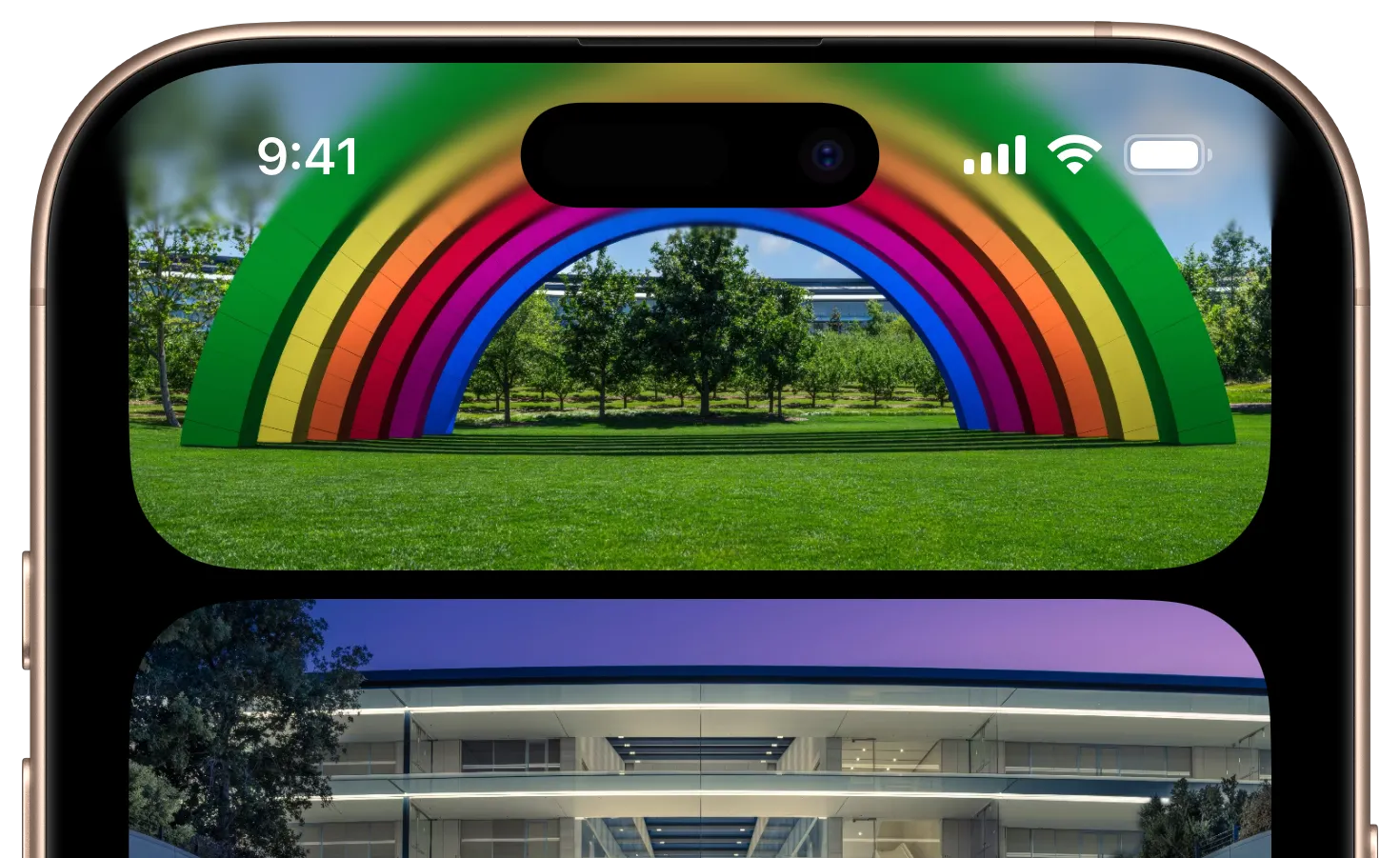




As of iOS 26, this is now a public API! Woohoo! However, please feel free to continue using this library if you need additional control, or need to continue supporting iOS 18.
BlurUIKit is an open source UI framework that exposes more of the dynamic blur capabilities of UIKit in an App Store safe way. Namely, it exposes the ‘progressive blur’ effect Apple has started using in system apps where underlaying content gets progressively more blurry along a gradient pattern. It also exposes the ability to apply gaussian blurs directly to live UIView objects, useful for dynamic blur-fade transitions.
Features
- Adds an extension on
UIViewto enable real time gaussian blurs on live view content. - Enables the ability to add a progressive blur gradient under areas that require higher contrast between layers.
- Allows an optional ‘dimming’ colored gradient to add additional contrast when needed.
- Dimming and blur gradients can be configured independently.
- Highly optimized to avoid regenerating gradient mask images unless needed.
- SwiftUI support via the
VariableBlurview wrapper.
Examples
BlurUIKit features a default configuration ready to use, but can be further modified depending on your app’s needs.
UIKit
// Create a new instance of `VariableBlurView`
let blurView = VariableBlurView()

// Set a tint color for the colored gradient.
blurView.dimmingTintColor = .red

// The tint color can 'overshoot' the blur view to add more gradual transition
blurView.dimmingOvershoot = .relative(fraction: 1.25)
SwiftUI
// Use the VariableBlur view with chainable modifiers
VariableBlur(direction: .down)
    .dimmingTintColor(.red)
    .dimmingOvershoot(.relative(fraction: 1.25))
UIView Blur Extension
Another feature of BlurUIKit is being able to apply gaussian blur to UIView instances.
// Create a new UIView instance
let redSquare = UIView(frame: CGRect(x: 0, y: 0, width: 100, height: 100))
redSquare.backgroundColor = .systemRed

// Apply gaussian blur to it
redSquare.blurRadius = 30.0
Requirements
BlurUIKit should work with iOS 14 and above. It may work on lower versions of iOS, but this hasnt been tested.
Installation
Manual Installation
Copy the contents of the BlurUIKit folder to your app’s project folder.
CocoaPods
# UIKit only (default)
pod 'BlurUIKit'

# Include SwiftUI support
pod 'BlurUIKit/SwiftUI'
Swift Package Manager
Add the following to your Package.swift:
dependencies: [
  // ...
  .package(url: "https://github.com/TimOliver/BlurUIKit.git"),
],
Then add the target dependency you need:
// UIKit only
.product(name: "BlurUIKit", package: "BlurUIKit")

// SwiftUI support
.product(name: "BlurSwiftUI", package: "BlurUIKit")
Is this really App Store safe?
tl;dr Yes, it should be 99.9% safe for the App Store. If your app gets rejected from this library, please open an issue.
While obviously you should always use the public APIs that Apple provides to you, there is definitely a ‘gray’ area in iOS where you can extend the functionality of public APIs, without doing anything unsafely.
Apple has historically said the reason they don’t like developers using private APIs is that they make no guarantees between major iOS versions that anything under the hood will stay consistent. This primarily applies to ultra-brazen things like dynamically linking to private frameworks. Conversely, even small, innocent things such as traversing the subviews of one of Apple’s UI components and moving them around internally (like I did with TONavigationBar) could be considered using a private API if the inner views aren’t public.
BlurUIKit is in a similar camp to traversing the inner views of an Apple UI component in terms of private API use. It takes advantage of the fact that CAFilter is actually exposed publicly on a public property of UIVisualEffectView, which we can access, and then make in-memory copies for our own use. In this way, we can safely ensure that since we’re not doing any internal runtime hacking or risky assumptions to access the object, there’s nothing for Apple to detect in App Review (probably).
Obviously, I’m not a huge fan of relying on these sorts of hacks, but I feel like this is a very special case. Not only is it straight-up not possible to achieve this visual effect using only public APIs (SwiftUI aside), but Apple now uses it so heavily in both the Home Screen and in the system apps that the effect is starting to become a part of the iOS visual design language. And so it feels wild to me that they haven’t made it a public API yet to let third-party developers achieve the same thing.
In iOS 26, Apple provided a new API on UIScrollView that enables this sort of effect, but the initial feedback I’m hearing from fellow developers is that it’s very limiting. You can’t change the blur radius or the size of the gradient. As such, it seems that this library still has value, even in iOS 26. It would be amazing if Apple fully exposed this effect as a public API. I’ve already opened FB13949531 asking them to consider making it as such. The more developers who duplicate that radar, the better chance we have of Apple doing so. If you love this effect as much as I do, please consider duplicating that radar.
Credits
BlurUIKit was created by Tim Oliver as a component of iComics.
License
BlurUIKit is available under the MIT license. Please see the LICENSE file for more information.
小弟调调 (@jaywcjlove): iOS 27 联系人/图片“顶部”还是个渐变效果
其它应用不是,是不是 SwiftUI 有什么 API 设置这个效果呢?
Similar Articles
My Week of Transparent Living With Apple’s ‘More Clear’ Liquid Glass Setting
Apple's iOS 27 public beta introduces a slider to adjust the transparency of the Liquid Glass UI, allowing users to make it more transparent or more opaque. The author tests the most transparent setting and describes the visual effects.
Apple dials down Liquid Glass, and the Mac looks way better for it
Apple's macOS 27 Golden Gate developer beta introduces a Liquid Glass transparency slider and design refinements, offering a less glossy look and improved sidebars, though performance gains are uncertain.
@10xmylife: Now iOS widgets don't need to upload wallpapers to become transparent? Is everyone using that private API?
Discussing whether iOS widgets no longer need to upload wallpapers to become transparent, and whether private APIs are widely used.
@NatashaTheRobot: This is the first video after Apple started releasing all WWDC sessions as videos that feels human and non-forced and r…
This tweet highlights a WWDC session video for its natural presentation and provides technical guidance for developers on adapting toolbars for iPhone Duo's new vertical layout using SwiftUI and UIKit.
@PrajwalTomar_: https://x.com/PrajwalTomar_/status/2072659398733013116
Describes a workflow combining FireVibe for AI-generated design and native code generation, then Claude Code for building backend logic, enabling rapid iOS app development without hand-coding UI.