@noahduck283: 可以下载任何 YouTube 视频、干净地去除人声、进行转录、翻译成 100 多种语言、克隆原声并完成全自动配音的工具。全程不到 2 分钟。100% 本地运行。免费 把六个顶级开源模型缝进了一个网页"一键下载、去人声、转录、翻译、配音"的…
摘要
Voice-Pro 是一个整合了六个顶级开源模型(Whisper、Demucs、CosyVoice、F5-TTS 等)的网页工具,支持 YouTube 视频下载、去人声、转录、翻译、语音克隆和全自动配音,全程不到2分钟,100%本地运行且免费。
查看缓存全文
缓存时间: 2026/05/22 23:59
可以下载任何 YouTube 视频、干净地去除人声、进行转录、翻译成 100 多种语言、克隆原声并完成全自动配音的工具。全程不到 2 分钟。100% 本地运行。免费
把六个顶级开源模型缝进了一个网页“一键下载、去人声、转录、翻译、配音“的神器 拆开看,转录是 Whisper,去人声是 Demucs,克隆声音是 CosyVoice 和 F5-TTS 全是各自领域最能打的那个
它叫 Voice-Pro
abus-aikorea/voice-pro
Source: https://github.com/abus-aikorea/voice-pro
Voice-Pro
The best AI speech recognition, translation, and multilingual dubbing solution 🚀



🎙️ An AI-powered web application for speech recognition, translation, and dubbing
 한국어
∙
한국어
∙
 English
∙
English
∙
 中文简体
∙
中文简体
∙
 中文繁體
∙
中文繁體
∙
 日本語
∙
日本語
∙
 Deutsch
∙
Deutsch
∙
 Español
∙
Español
∙
 Português
Voice-Pro is a state-of-the-art web app that transforms multimedia content creation. It integrates YouTube video downloading, voice separation, speech recognition, translation, and text-to-speech into a single, powerful tool for creators, researchers, and multilingual professionals.
- 🔊 Top-tier speech recognition: Whisper, Faster-Whisper, Whisper-Timestamped, WhisperX
- 🎤 Zero-shot voice cloning: F5-TTS, E2-TTS, CosyVoice
- 📢 Multilingual text-to-speech: Edge-TTS, kokoro (Paid version includes Azure TTS)
- 🎥 YouTube processing & audio extraction: yt-dlp
- 🌍 Instant translation for 100+ languages: Deep-Translator (Paid version includes Azure Translator)
A robust alternative to ElevenLabs, Voice-Pro empowers podcasters, developers, and creators with advanced voice solutions.
⚠️ Please Note
- Due to WeConnect development work, Voice-Pro development and updates are not possible for the time being.
- We have made all Voice-Pro code open source and completely free. Voice-Pro can now be freely distributed and modified by anyone.
- It works well on Windows with NVIDIA GPU. Operation on Mac and Linux has not been verified.
- Please leave your requests on the
or
pages.
- Troubleshooting: In most cases, issues can be resolved by deleting the
installer_filesfolder and then runningconfigure.batfollowed bystart.bat.
📰 News & History
version 3.2
- We have been focusing on WeConnect development for the past few months and have not been able to manage Voice-Pro at all.
- We have decided to open source all Voice-Pro code.
- Voice-Pro is completely free and supports Windows, Mac, Linux.
- WeConnect is an application for global cultural exchange.
- Connect with people from all over the world for meaningful cultural exchanges, language learning, and international friendships.


version 3.1
- 🪄 Support for fine-tuned models of F5-TTS
- 🌍 Supported languages
- English & Chinese: SWivid/F5-TTS_v1
 Finnish: AsmoKoskinen/F5-TTS_Finnish_Model
  French: RASPIAUDIO/F5-French-MixedSpeakers-reduced
  Hindi: SPRINGLab/F5-Hindi-24KHz
  Italian: alien79/F5-TTS-italian
 - Japanese: Jmica/F5TTS/JA_21999120
 Russian: hotstone228/F5-TTS-Russian
 - Spanish: jpgallegoar/F5-Spanish
version 3.0
- 🔥 Removed the AI Cover feature.
- 🚀 Added support for m-bain/whisperX.
version 2.0
- 🐍 Built with Python 3.10.15, Torch 2.5.1+cu124, and Gradio 5.14.0.
- 🆓 Free trial supports media up to 60 seconds in length.
- 🔥 Added the AI Cover feature.
- 🎤 Introduced support for CosyVoice and kokoro.
- ⏳ Initial run downloads CozyVoice2-0.5B (9GB), which may take over an hour depending on network speed.
- 🎧 Voice samples for cloning will be continuously updated.
- 📝 Added spaCy for natural sentence-by-sentence translation and TTS.
- ☁️ Subscription version includes Microsoft Azure Translator and TTS.
- 🏪 Subscription offers unlimited usage (no 60-second limit) during the subscription period, available via
 .
.
🎥 YouTube Showcase
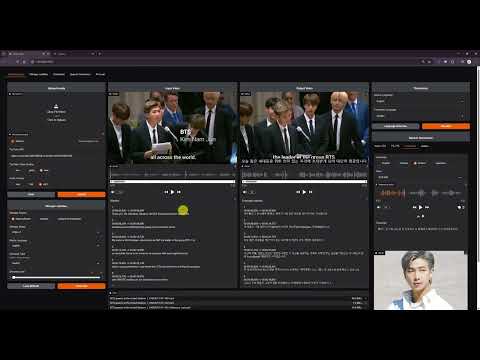

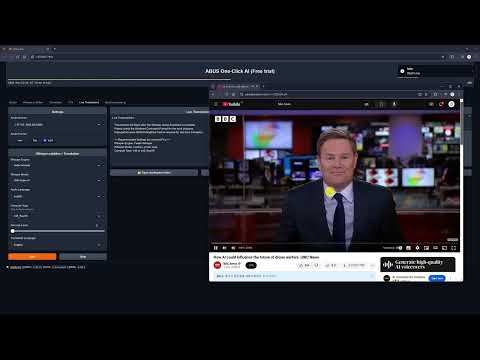




⭐ Key Features
1. Dubbing Studio
- YouTube video downloads & audio extraction
- Voice separation with Demucs
- Supports 100+ languages for speech recognition & translation
2. Speech Technologies
- Speech-to-Text: Whisper, Faster-Whisper, Whisper-Timestamped, WhisperX
- Text-to-Speech:
- Edge-TTS: 100+ languages, 400+ voices
- E2-TTS, F5-TTS, CosyVoice: Zero-shot cloning
- kokoro: Ranked #2 in HuggingFace TTS Arena
3. Real-Time Translation
- Instant speech recognition
- Multilingual translation on the fly
- Customizable audio inputs
🤖 WebUI
Dubbing Studio Tab
- All-in-one hub: YouTube downloads, noise removal, subtitles, translation, & TTS
- Supports all ffmpeg-compatible formats
- Output options: WAV, FLAC, MP3
- Subtitles & recognition for 100+ languages
- TTS with speed, volume, & pitch controls

Whisper Caption Tab
- Subtitle-focused: 90+ languages
- Video-integrated subtitle display
- Word-level highlighting & denoise options
Translate Tab
- Translation for 100+ languages
- Supports subtitle files (ASS, SSA, SRT, etc.)
- Real-time voice recognition & translation

Speech Generation Tab
- Options: Edge-TTS, F5-TTS, CosyVoice, kokoro
- Celeb voice podcasts & multilingual support

🎤✨ Reference Voice
- Please request the voice you want to add on the Issues page. Issues
English
 Andrew Bustamante |
 Andrew Huberman |
 Avi Loeb |
 Ben Shapiro |
 Brett Johnson |
 Brian Keating |
 Coffeezilla |
 Dan Carlin |
 David Buss |
 David Fravor |
 David Kipping |
 Dennis Whyte |
 Donald Hoffman |
 Donald Trump |
 Douglas Murray |
 Duncan Trussell |
 Elon Musk |
 Garry Nolan |
 Jack Barsky |
 James Sexton |
 Jeff Bezos |
 Joe Rogan |
 John Mearsheimer |
 Jordan Peterson |
 Kanye 'Ye' West |
 Mark Zuckerberg |
 Michael Levin |
 Michael Saylor |
 Michio Kaku |
 MrBeast |
 Nick Lane |
 Paul Rosolie |
 Ryan Graves |
 Sam Altman |
 Sam Harris |
 Stephen Wolfram |
 Tucker Carlson |
 Vitalik Buterin |
 Yuval Harari |
Chinese
 迪丽热巴 (Dílì Rèbā) |
 蔡依林 (Cài Yīlín) |
 吴亦凡 (Wú Yìfán) |
 李易峰 (Lǐ Yìfēng) |
 杨幂 (Yáng Mì) |
 赵丽颖 (Zhào Lìyǐng) |
Korean
 BTS 진 (Jin) |
 BTS RM |
 IU (아이유) |
 이병헌 |
 이정재 |
 유재석 |
Japanese
 綾瀬はるか (Ayase Haruka) |
💻 System Requirements
- OS: Windows 10/11 (64-bit), Linux, Mac
- GPU: NVIDIA with CUDA 12.4 (recommended)
- VRAM: 4GB+ (8GB+ preferred)
- RAM: 4GB+
- Storage: 20GB+ free space
- Internet: Required
📀 Installation
Install Voice-Pro with ease using configure.bat and start.bat (use configure.sh and start.sh on Mac/Linux).
1. Get the Package
- Clone or download the latest release (Source code (zip)) from
git clone https://github.com/abus-aikorea/voice-pro.git
2. Install & Run
- 🚀 configure.bat
- Sets up git, ffmpeg, and CUDA (if NVIDIA GPU)
- Run once; takes 1+ hour with internet
- Don’t close the command window
- 🚀 start.bat
- Launches Voice-Pro WebUI
- First run installs dependencies (1+ hour)
- Retry after deleting installer_files if issues arise
3. Update
- 🚀 update.bat: Refreshes Python environment (faster than reinstall)
4. Uninstall
- Run uninstall.bat or delete the folder (portable install)
❓Tips & Tricks
If Browser does not run automatically
- Close the Windows-Commnad window and run start.bat again.
- Run the browser directly and enter the address displayed in the Windows-Command window (e.g. http://127.0.0.1:7870) in the address bar.
If a CUDA Out-Of-Memory error occurs
- Check the GPU memory status in Windows Task Manager - Performance tab.
- Set the Denoise level to 0 or 1. Denoise level 2 requires at least 8GB of GPU memory.
- Set Compute Type to int type. The float type has better quality, but requires more GPU memory.
How to improve the quality of subtitles?
- The quality of subtitles tends to improve with larger Whisper models, but this is not necessarily the case. large > medium > small > base > tiny
- Among compute types, float type has good performance. The int type is a model that reduces GPU usage and increases speed through model quantization. On the other hand, performance decreases.
- If you increase the denoise level, more background sounds will be removed, and only the remaining voice will be used for voice recognition. It does not always guarantee good results.
🚨 Notice
- Due to WeConnect development work, there will be no Voice-Pro updates for the time being.
- All Voice-Pro code has been made open source. It is now completely free to use.
- WeConnect is a communication platform for global cultural exchange.
⏳ SaaS Platforms for Subtitling, Translation, and TTS
The following table lists SaaS platforms supporting subtitling, translation, and text-to-speech (TTS/dubbing) functionalities. Costs are calculated for processing a 60-minute Korean video, including subtitle generation, English translation, and English dubbing, based on the latest available pricing data as of April 15, 2025.
| Platform | Subtitling | Translation | TTS/Dubbing | Cost for 60-min Video (USD, Approx.) | Key Features |
|---|---|---|---|---|---|
| Maestra | ✅ | ✅ | ✅ | $23.70 | 125+ languages, real-time captions, SEO keyword extraction, 15-min free trial. |
| Kapwing | ✅ | ✅ | ✅ | 30~40 (Pro plan, per minute) | AI subtitles, 100+ language translations, auto lip-sync dubbing, free tier. |
| VEED.IO | ✅ | ✅ | ❌ | 24~36 (Pro plan, partial) | 99.9% accurate subtitles, Instagram-optimized captions, intuitive editor. |
| HappyScribe | ✅ | ✅ | ✅ | 36~48 (Pay-as-you-go) | 120+ languages, professional proofreading, secure, meeting transcription. |
| Sonix | ✅ | ✅ | ✅ | 30~40 (Standard plan) | 54+ languages, 30-min free transcription, YouTube/Zoom integration. |
| Descript | ✅ | ✅ | ✅ | 36~48 (Creator plan) | Text-based editing, Overdub TTS, filler word removal, 1-hour free transcription. |
| AppTek | ✅ | ✅ | ✅ | Custom pricing (Contact) | Media-focused, custom models, metadata generation, cloud-based Workbench. |
| Transkriptor | ✅ | ✅ | ❌ | 12~18 (Pay-as-you-go) | 100+ languages, YouTube link transcription, 99% accuracy, simple editor. |
Cost Calculation Details
- Maestra: Premium Plan ($158/month, 1200 credits). 60-min video: 60 credits (subtitles) + 60 credits (translation) + 60 credits (dubbing) = 180 credits. Cost = (180/1200) * $158 = $23.70.
- Kapwing: Pro plan (~$24/month, limited minutes). Estimated 0.50\~0.67/min for subtitles+translation+dubbing (based on per-minute pricing trends). 60-min cost: 30\~40. Exact pricing requires confirmation.
- VEED.IO: Pro plan (~$24/month). Subtitles+translation estimated at 0.40\~0.60/min. No TTS, so partial processing. 60-min cost: 24\~36. Confirm at veed.io.
- HappyScribe: Pay-as-you-go (~$0.20/min transcription, $0.20/min translation, $0.20/min dubbing). 60-min cost: 36\~48 (assuming combined services). Confirm at happyscribe.com.
- Sonix: Standard plan (~$10/hour transcription, additional for translation/dubbing). Estimated 0.50\~0.67/min total. 60-min cost: 30\~40. Confirm at sonix.ai.
- Descript: Creator plan (~$24/month, limited hours). Estimated 0.60\~0.80/min for subtitles+translation+dubbing. 60-min cost: 36\~48. Confirm at descript.com.
- AppTek: Custom pricing for enterprise. No public per-minute rates. Contact apptek.ai for quotes.
- Transkriptor: Pay-as-you-go (0.05\~0.10/min transcription, similar for translation). No TTS, so partial processing. 60-min cost: 12\~18. Confirm at transkriptor.com.
Notes
- Cost for 60-min Video: Costs are approximate and assume processing a 60-minute Korean video for subtitles, English translation, and English dubbing (where available). Platforms without TTS (e.g., VEED.IO, Transkriptor) reflect partial processing costs.
- Language Support: Most platforms support Korean and English. Verify specific language availability on their websites.
- Use Cases:
- Media/Entertainment: AppTek, Maestra
- Social Media: Kapwing, VEED.IO
- Podcasts/Interviews: Sonix, Descript
- E-learning/Global Content: Transkriptor, HappyScribe
- Pricing Updates: Pricing may vary due to plan changes or promotions. Check official websites for the latest details.
- For contributions or specific use case recommendations, open an issue or submit a pull request in this repository!
☕ Contributions
Hello, I’m David from the Voice-Pro team. Our team discovers the best AI technologies in the industry and provides them for anyone to use easily and conveniently. We are a small startup in Korea that has only been around for a year. We are working hard to help you and other creators produce great content.
Your ⭐⭐⭐⭐⭐ review would be greatly appreciated as it helps our business grow with you. Please help support our small team.
Thank you, ABUS Customer Service
- If you want to participate in and help us with this project, feel free to create an Issues
- If something goes wrong, please submit a Pull requests to improve this project.
- Any type of contribution is welcome.
- For inquiries related to purchases, business partnerships, technical tuning, investments, and other matters, please contact us by email. ([email protected]).“
- If you like this project, please star this repository. We would greatly appreciate it. ⭐⭐⭐
- You can support Voice-Pro with a donation here:

📬 Contact
- Email: [email protected]
- Homepage (Korean): https://www.wctokyoseoul.com
- Paid Version Purchase: Shopify (Global), Naver (Korean)
🙏 Credits
- Demucs: https://github.com/facebookresearch/demucs
- yt-dlp: https://github.com/yt-dlp/yt-dlp
- gradio: https://github.com/gradio-app/gradio
- edge-TTS: https://github.com/rany2/edge-tts
- F5-TTS: https://github.com/SWivid/F5-TTS.git
- openai-whisper: https://github.com/openai/whisper
- faster-whisper: https://github.com/SYSTRAN/faster-whisper
- whisper-timestamped: https://github.com/linto-ai/whisper-timestamped
- whisperX: https://github.com/m-bain/whisperX
- CosyVoice: https://github.com/FunAudioLLM/CosyVoice
- kokoro: https://github.com/hexgrad/kokoro
- Deep-Translator: https://github.com/nidhaloff/deep-translator
- spaCy: https://github.com/explosion/spaCy
©️ Copyright
 by ABUS
相似文章
@yhslgg: 老杨再特么分享一个宝藏开源工具——KrillinAI,GitHub 10000 星,做多语言音视频内容的绝对值得看! 一句话:从视频下载到字幕翻译、AI配音、视频合成,整条链路全包,还能自动生成平台封面,B站、抖音、小红书、YouTube…
KrillinAI 是一款开源工具,整合了视频下载、字幕翻译、AI配音、视频合成全流程,支持上下文感知翻译、语音克隆、自动布局和封面生成,兼容多种AI模型,适合多语言音视频内容创作与分发。
@Huahuazo: 这声音克隆工具我试完直接愣住了。 随手截了8秒自己说话的录音扔进去,出来的声音——语气、停顿、那种欠欠的调调,简直跟我本人在抬杠一模一样。 最绝的是完全本地跑,音频不用上传,隐私安全直接拉满。说实话第一反应不是厉害,是头皮发麻:以后光凭一…
介绍本地声音克隆工具VoiceStudio,只需8秒录音即可高度还原声音,完全本地运行保护隐私,支持多种语言和平台。
@FakeMaidenMaker: 炸裂!这个开源项目免费文字转无 AI 味人声,还能克隆任何人的嗓音,并且用文字调整音色! GitHub 狂揽 30K star,出自面壁智能 OpenBMB,VoxCPM 之前拿过 GitHub 和 HuggingFace 双榜第一。 做…
VoxCPM2是OpenBMB开源的语音合成模型,采用无分词器的扩散自回归架构,支持30种语言、语音设计和可控语音克隆,仅需一句话即可克隆音色,或用文字创建全新声音,输出48kHz高质量音频,可商用。
@hank_aibtc: 卧槽,真的被这个东西惊到了。 挖到一个叫 KrillinAI 的本地工具,免费,视频翻译、精准字幕、超自然配音、声音克隆,全流程一条龙搞定。 中英互翻效果特别稳, Whisper识别准确率高得离谱, LLM按段翻译上下文不乱, CosyV…
介绍 KrillinAI,一个免费本地运行的视频翻译工具,支持精准字幕、自然配音和声音克隆,集成了 Whisper、LLM 和 CosyVoice,支持 Win/Mac 及 yt-dlp。
@GitTrend0x: 卧槽兄弟们 本地跑语音克隆+电影级视频配音,直接支持646种语言,完全离线、无API密钥、无需联网,ElevenLabs直接被干翻 https://github.com/debpalash/OmniVoice-Studio… 这波开源神器…
OmniVoice Studio is an open-source desktop app that enables local voice cloning and cinematic video dubbing across 646 languages, fully offline with no API keys, positioning itself as a privacy-focused alternative to ElevenLabs.