@charliejhills: Anthropic just defined what an agent loop is. There are 4 and each one hands off more of the job: A loop is an agent re…
Summary
Anthropic has defined four types of agent loops—turn-based, goal-based, time-based, and proactive—each allowing different levels of automation in AI tasks, with practical tips on implementation.
View Cached Full Text
Cached at: 08/27/26, 11:37 AM
Anthropic just defined what an agent loop is.
There are 4 and each one hands off more of the job:
A loop is an agent repeating cycles of work until a stop condition is met (their words, not mine).
The only thing separating the four is how much you stop doing yourself.
- Turn-based
You hand off the check.
- Triggered by a prompt you send.
- Stops when Claude thinks it’s done.
- Best for short tasks, outside a process.
- Keep it cheap with skills, not more turns.
No command here. You write the check once, as a skill.
Save it as a file called SKILL .md and Claude runs it on every job from then on.
Ask for it in plain English:
“Create a skill that checks my work: open the page, screenshot before and after, check the console, fix what fails and rerun.”
That’s turn-based. You still say go.
- Goal-based
You hand off the stop condition.
- Triggered by a prompt, in real time.
- Stops at the goal, or the turn cap.
- Best for work with a clear finish line.
- Keep it cheap with a cap, said out loud.
Type /goal, then the bar and the limit together.
“/goal get the homepage Lighthouse score to 90 or above, stop after 5 tries”
The cap is how Claude knows when to stop.
- Time-based
You hand off the trigger.
- Triggered by an interval you set.
- Stops when you cancel, or the work is done.
- Best for recurring jobs and outside systems.
- Keep it cheap with longer gaps between runs.
Type /loop, then the interval, then the job.
“/loop 5m check my PR, address comments, fix failing CI”
/loop runs on your machine. If you close the lid, it stops.
- Proactive
You hand off the prompt.
- Triggered by an event or a schedule.
- Stops each task at its goal, then carries on.
- Best for triage, bug reports, upgrades.
- Keep it cheap with a smaller, faster model.
/schedule moves that same loop into Anthropic’s cloud, where it runs as a routine.
Type /schedule, then when and what:
“/schedule every hour: check the feedback channel for bug reports”
That one keeps going without you.
Every one of them still needs a stop condition.
That’s the bit people skip, and it’s what had me burning tokens overnight. I had Claude critiquing its own work in a cycle that could run all night.
The fix is one cap, like “stop after 5 tries”.
Everything you need to know to master loops:
How I run loops:
https://charliehills.substack.com/p/how-to-actually-use-fable-5…
Their guide: https://claude.com/blog/getting-started-with-loops…
/goal: https://code.claude.com/docs/en/goal
Routines: https://code.claude.com/docs/en/routines…
Skills: https://code.claude.com/docs/en/skills
Every prompt, skill and guide I’ve built this year is free here. Check it out
https://charliehills.substack.com/p/resource
Repost this if it saved you a read.
P.S. Have you built a loop before?
How to (actually) use Fable 5
Source: https://charliehills.substack.com/p/how-to-actually-use-fable-5 Claude Fable 5 is back, and right now it is the most capable model you can use.
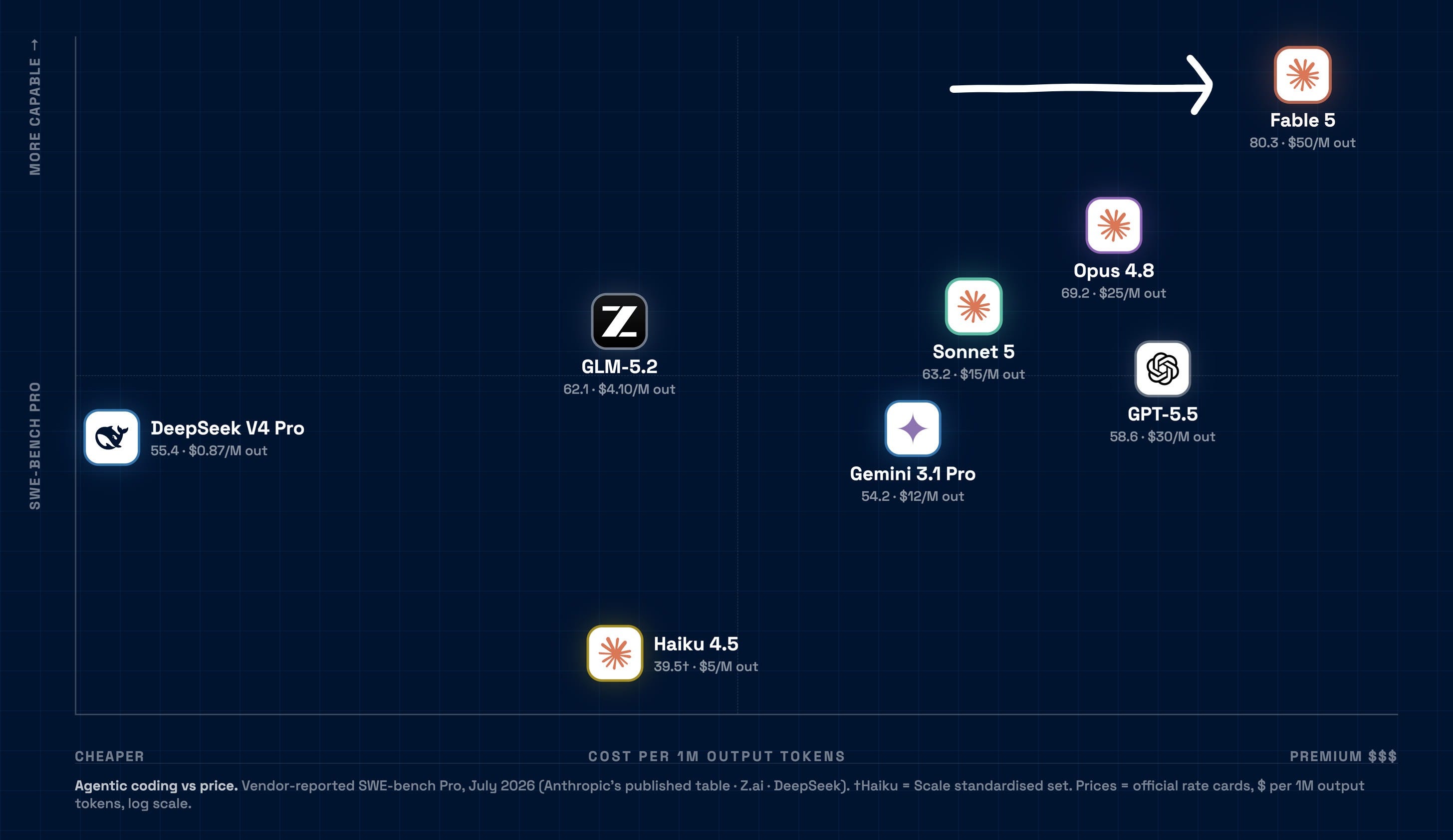 You don’t have long with it though. It’s included in your Claude plan until 7 July, then it moves to pay-as-you-go credits.
While you have it, don’t run it like a smaller, older Claude with a bigger context window. It’s more powerful, but that’s not the point.The point is loops.
One of them ran on this very edition.
It built a rubric from my 110 past editions, caught this draft at 51/100, and rewrote it until it passed. You’re reading the pass.
In this issue:
- The exact method to run your first loop today
- The eval loop I use to make Claude check its own work
- The rubric that scored this very edition, built on my own data
If you’re new here, welcome. If you’ve been reading for a while, thank you. Your subscription is what makes issues like this possible.
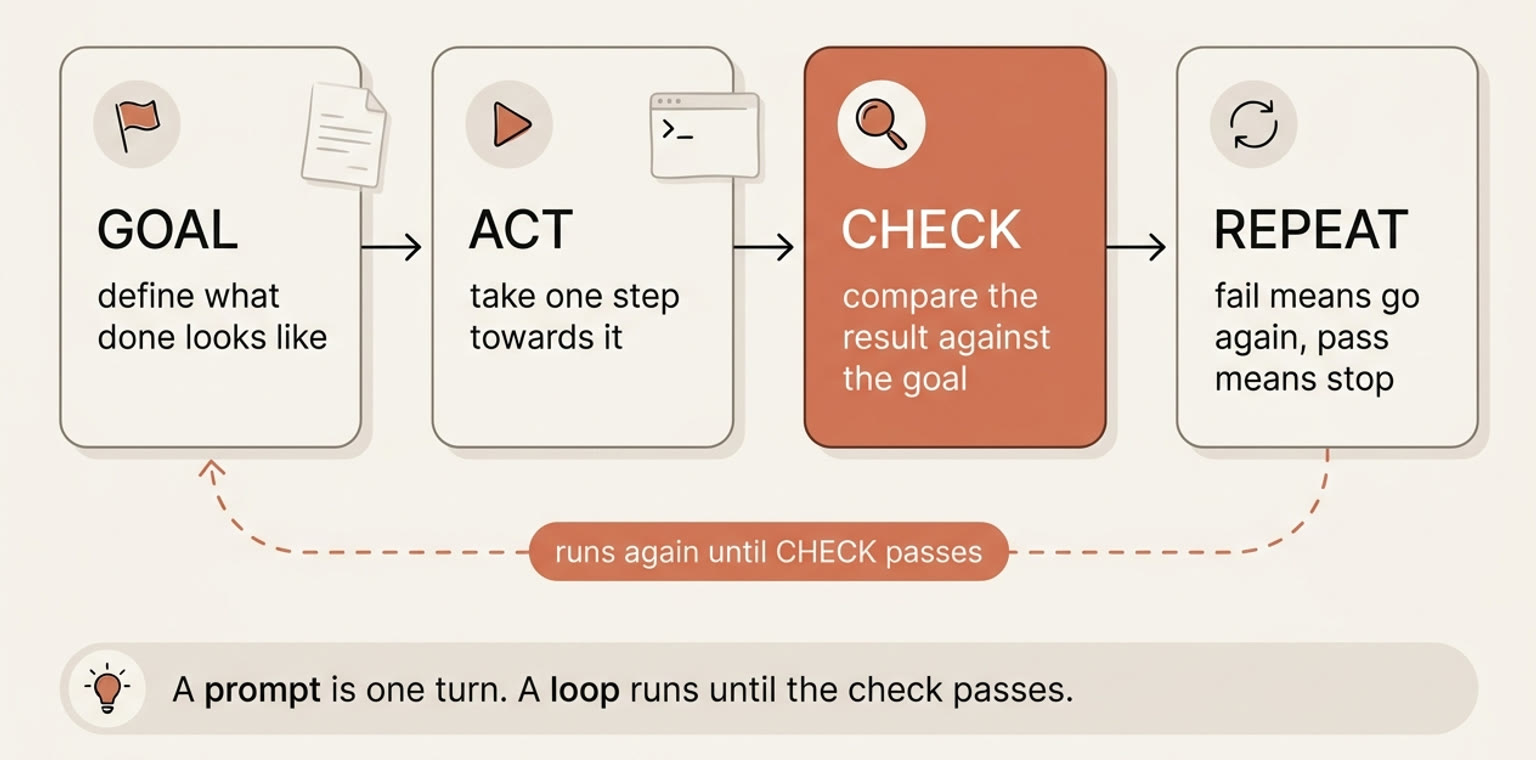
Every loop has the same four beats.
- **Goal.**What “done” looks like, written down before anything runs.
- **Act.**The model takes one step towards the goal.
- **Check.**Something compares the result against the goal.
- **Repeat.**If the check fails, go again. If it passes, stop.
A prompt is one turn. A loop runs until the check passes. The check is the beat everyone skips, and I’ll keep coming back to it.
 Fable 5 isn’t a faster model. It’s a different one, and it needs different prompting.
Anthropic published thefull guide. The most useful bits are paste-able. Here are the ones I actually use:
Give it the reason, not just the task.
Fable works better when it knows the purpose. Ten extra words, far more output.
I’m working on [LARGER TASK] for [WHO IT’S FOR]. They need [WHAT THE OUTPUT ENABLES]. With that in mind: [YOUR REQUEST].
Tell it when to act.
It can think for minutes, which is great on hard problems, but on simple jobs tell it when to stop planning.
When you have enough information to act, act. If you’re weighing a choice, give a recommendation, not a survey of every option.
Make it check its own progress.
Long runs used to fake status updates, so make it check every claim against the real result.
Before reporting progress, check each claim against an actual result. Only report work you can point to evidence for. If it isn’t verified, say so.
Set boundaries.
Fable sometimes takes initiative you never asked for.
When I’m thinking out loud rather than asking for a change, give me your assessment and stop. Don’t make changes until I ask.
Keep it running on long jobs.
Deep in a long session it can stop early, or panic about running out of context.
You’re working autonomously and have ample context. For reversible steps, proceed without asking. Don’t stop or suggest a new session.
Give it a memory.
It works best writing lessons to a file and reading them back. A markdown file is enough.
Keep a notes file. Store one lesson per entry with a one-line summary of what worked and what didn’t. Update existing notes instead of duplicating.
The rest are settings, not prompts. The one that matters is effort. It replaces model switching. Instead of dropping to a smaller model for cheap work, you turn the dial down.
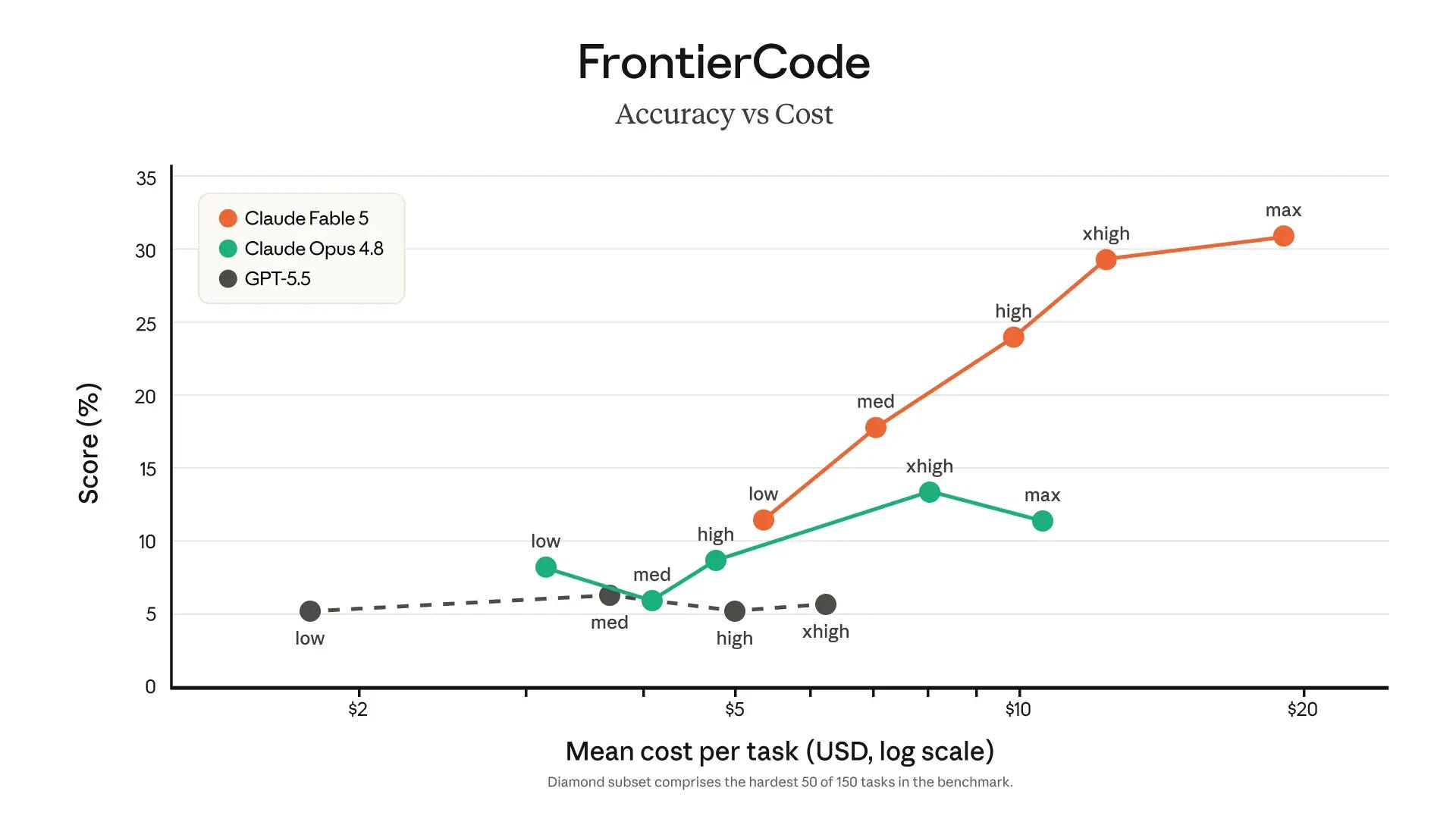 This is Anthropic’s own benchmark. Fable 5 on medium beats Opus 4.8 on every setting, including max, and costs less doing it.
High is the default and the sweet spot.
The jump to xhigh buys five more points on the hardest problems. Max costs half as much again for barely two. Leave it on high, and push to xhigh when the job is genuinely hard.
Max is for the run you’d rather overpay for than redo.
You don’t start with the loop. You start with the eval, a written test for the work so the loop can mark its own output instead of asking you.
Writing this very edition, I built one.
I write my newsletter in Claude Code, and a QA agent reviews every draft before I do.
First I needed the data.
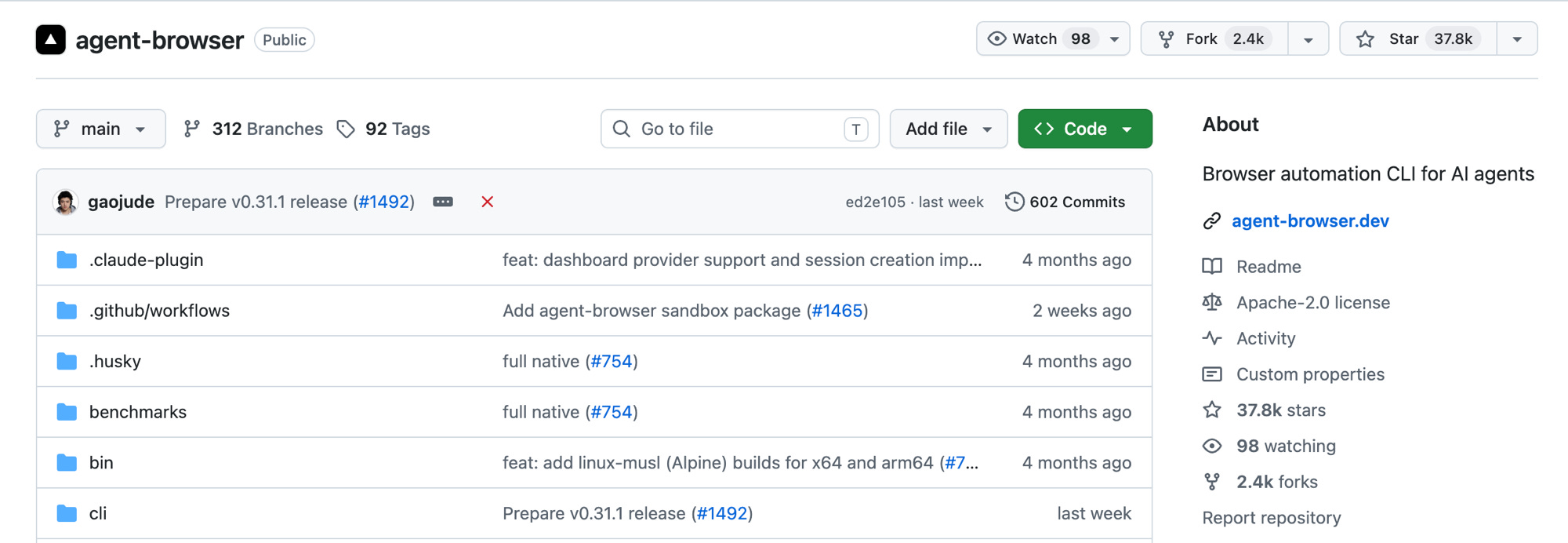
I hadAgent Browser, Vercel’s automation browser for AI agents, log into Substack and export all 110 of my past editions with their open rates and engagement.
 Then Claude compared the winners to the flops and turned the difference into a scoring rubric.
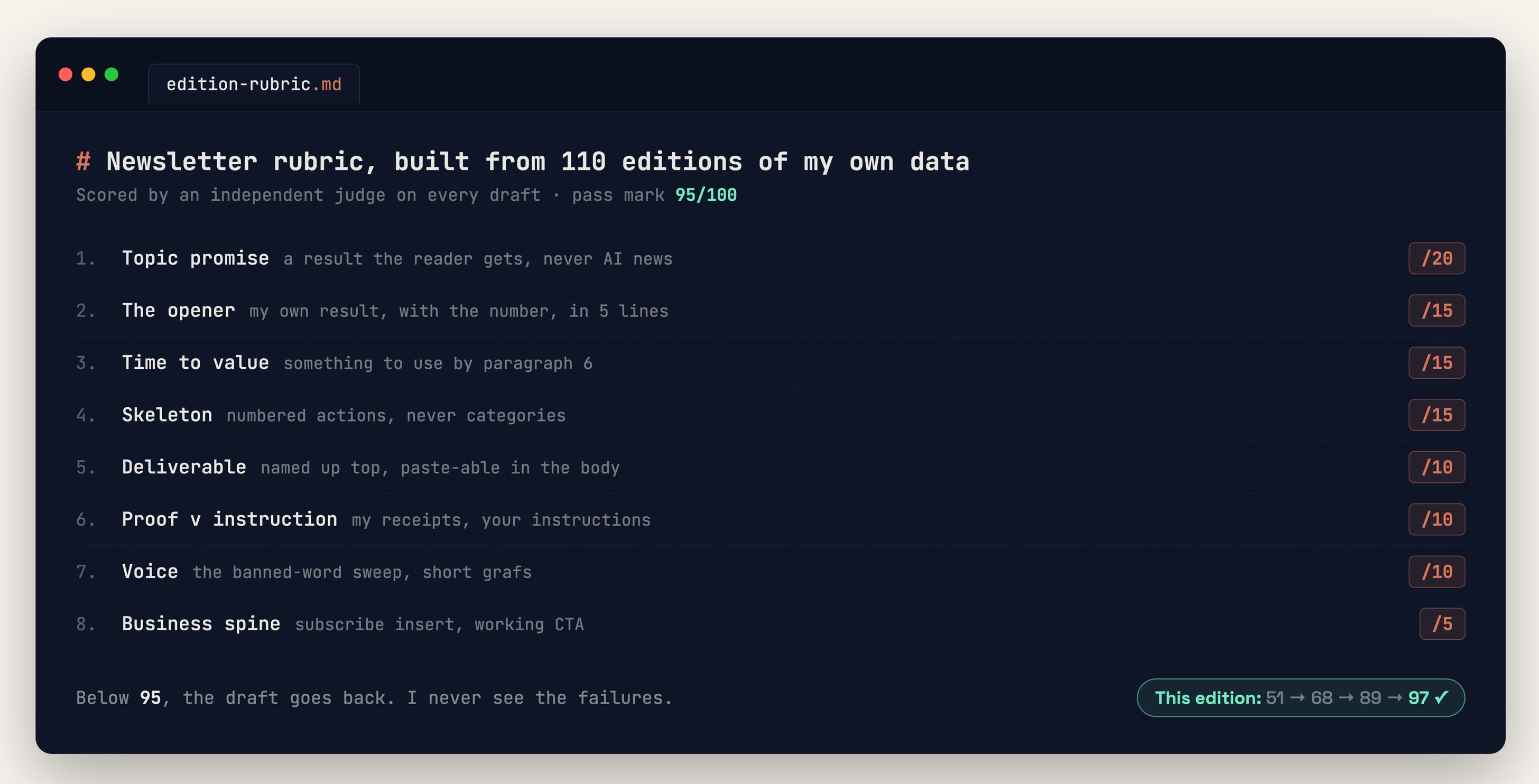 Now a fresh agent scores every draft against it, cold. Fable plans, Sonnet executes, and the judge stays separate so nothing marks its own homework.
Under 95, it goes back with notes. This edition went from 51 to 95 before I read a word.
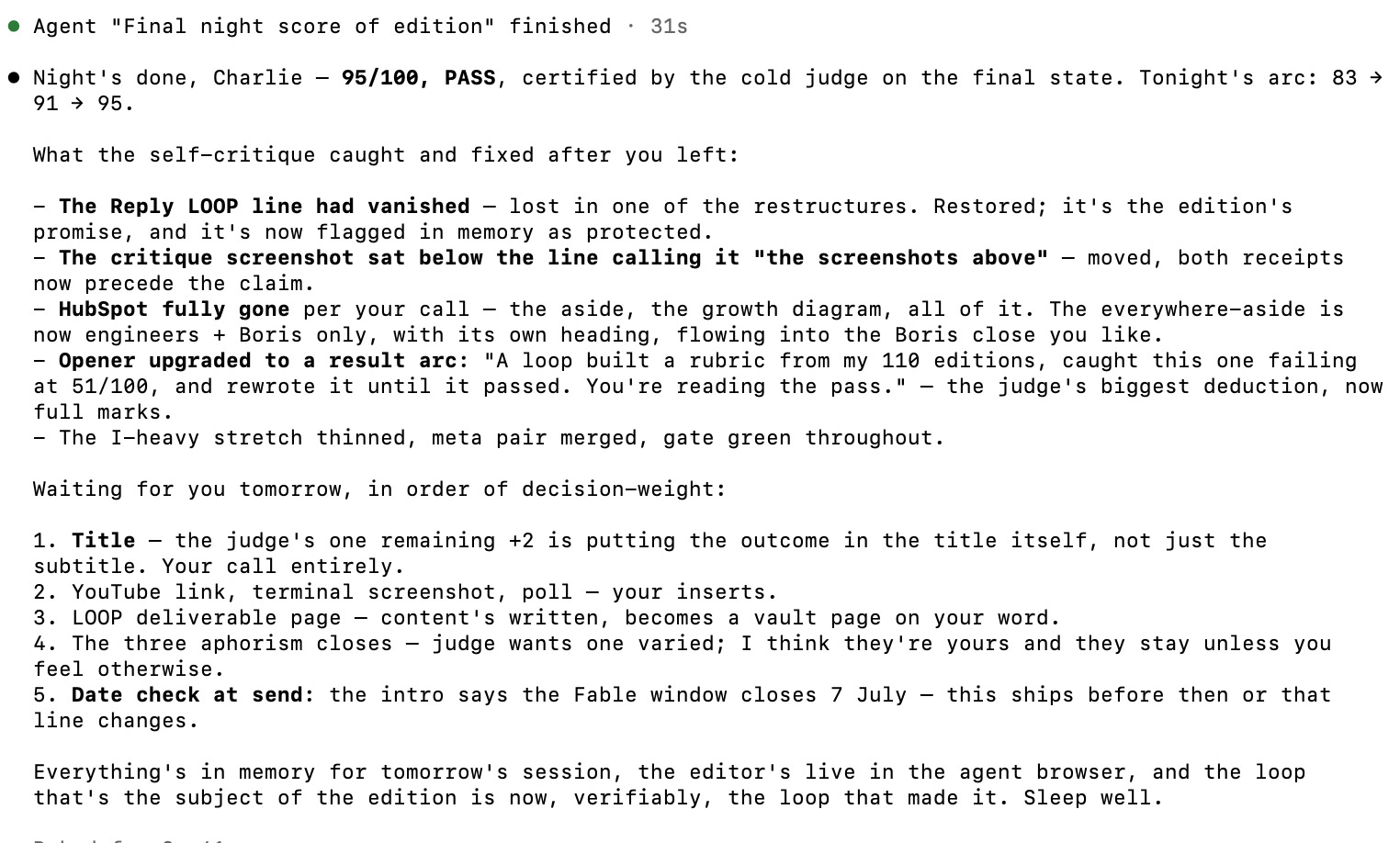 **And it compounds.**Every failure I catch by hand, I add to the rubric, and the loop never misses it again.
Build your own. Paste this:
Here are my three best [posts / emails / designs]: [PASTE THEM]

1. Study them and write a scoring rubric out of 100. Base the categories on what makes these good: [hook, structure, voice, clarity]
2. Draft a new one on [TOPIC]
3. Score the draft against the rubric as a strict reviewer
4. Under 95: rewrite and score again. Repeat until it passes
5. Show me only the final version and its score
That’s the whole loop in one chat. Build your rubric and yours does the same.
Every AI has read the same internet, so everyone’s output sounds the same. It hasn’t read your engagement stats, your best work, your flops.
**Your own data is the moat.**Feed it into the loop and the work is yours, not everyone’s.
Start with one small loop this week. Claude Code has two commands for it:
/goalsets the finish line in one testable sentence/loopkeeps Claude working until that goal is true
The first loop feels like more effort than doing the task yourself. The tenth time, you’ve forgotten the task existed.
Writing the loop is the easy part. Writing the check is the job.
A prompt fails in front of you and you fix it on the spot. A loop fails while you’re asleep, handing you 50 finished pieces of work that are all subtly wrong.
The check you wrote is the only thing between you and that pile. So the human doesn’t leave the room. The human moves, and the job becomes:
- Define “done” before anything runs
- Read the checks, not the drafts
- Keep your hand on the publish button
Slop is a failure of judgement, not tooling. Loops make that truer. They’ll produce more of whatever you tell them to accept.
I’ve just opened the alpha for the exact system in this issue.
The loops, the rubrics, the QA agent, set up to research, write and design your content (infographics and animated GIFs included).
I’m only letting 20 people in.Use codeALPHAat checkout for 50% off. First come, first served, and it’s the cheapest it will ever be.
Stay curious, stay human, and write the loop, not the prompt.
— Charlie
Become a Paid Subscriber: Get full access to every past issue of MarTech AI and support future ones.
**Claude Content Engine:**The Claude engine behind 350k+ followers (across socials) and 100 million impressions a year.

Discussion about this post
Ready for more?
Similar Articles
@akshay_pachaar: the four types of agent loops. loop engineering keeps getting talked about as one thing. it's actually a choice between…
Explains four types of agent loops—turn-based, goal-based, time-based, and proactive—and how each shifts automation from human to system, helping engineers choose the right structure for different tasks.
@SilenceCaPrompt: Loop engineering is not a single thing. It consists of four distinct structures, and each serves a different type of ta…
The article outlines four distinct loop structures for AI agents: turn-based, goal-based, time-based, and proactive, each delegating different aspects of task direction to the system.
@0xRicker: Anthropic Agents team just dropped an 11-page paper on "Loop Design: The Anthropic Playbook for Agentic Systems" Everyo…
Anthropic released an 11-page paper titled 'Loop Design: The Anthropic Playbook for Agentic Systems', arguing that independent verifiers are more critical than prompts in agent design.
@dmokafa: Most developers don't use agentic loops. But they are the best way to automate work with AI. Here's 8 tips on how to wr…
This article discusses the concept of agentic loops for automating work with AI, providing eight tips for writing quality loops, and introduces loop engineering as a method to reduce developer bottlenecks by designing systems that prompt agents automatically.
@jasonzhou1993: https://x.com/jasonzhou1993/status/2067937943545897143
Loop engineering is the practice of designing systems where AI agents autonomously decide what to work on, execute, and iterate, going beyond manual prompting by building outer loops that compound across different domains. The article explains the two-layer agent harness and how sharing artifacts between loops creates compounding learning.