Emacs newcomers-presets 主题中有什么?
摘要
本文详细介绍了 Emacs 31 中引入的新 'newcomers-presets' 主题的功能和设置,该主题旨在通过预设配置改善新用户的使用体验。
<p><a href="https://lobste.rs/s/307nji/what_s_emacs_newcomers_presets_theme">评论</a></p>
查看缓存全文
缓存时间: 2026/09/03 10:02
# Emacs 新手预设主题详解 :: Sacha Chua
来源:https://sachachua.com/blog/2026/04/what-s-in-the-emacs-newcomers-presets-theme/
«YE24:Sacha与Prot探讨Emacs新手入门工具包(https://sachachua.com/blog/2026/04/yay-emacs-sacha-and-prot-talk-emacs-newbies-starter-kits/)»(正在改进Emacs新手体验(https://sachachua.com/blog/2026/04/working-on-the-emacs-newbie-experience/))
发布于:2026年4月29日 - 修改于:2026年8月31日 | Emacs (https://sachachua.com/blog/category/emacs)
[2026-08-31 周一]:补充了 Emacs 31 的说明。将 `flyspell-mode` 的代码示例改为 `flymake-mode`。感谢 jeenajeena!
Emacs 31(2026年8月发布)以及2026年2月之后的开发版本包含了一个 `newcomers-presets` 主题,可以从启动屏幕启用,或通过 `M-x load-theme RET newcomers-presets RET` 命令启用。(不清楚如何运行该命令?请先阅读引导教程(https://www.gnu.org/software/emacs/tour/)或从Emacs菜单选择“帮助 - 教程”。)
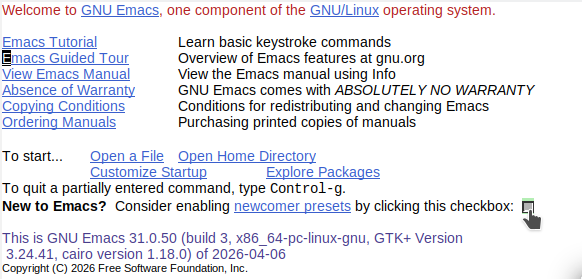
*图 1:新手预设选项位于启动屏幕上*
如果你喜欢它并希望在今后的 Emacs 会话中自动启用:
1. 使用 `M-x customize-themes`
2. 通过点击或使用 TAB 导航到 `newcomers-presets` 旁边的复选框,然后按 RET 选中。
3. 点击或按 RET 选择**保存主题设置**。
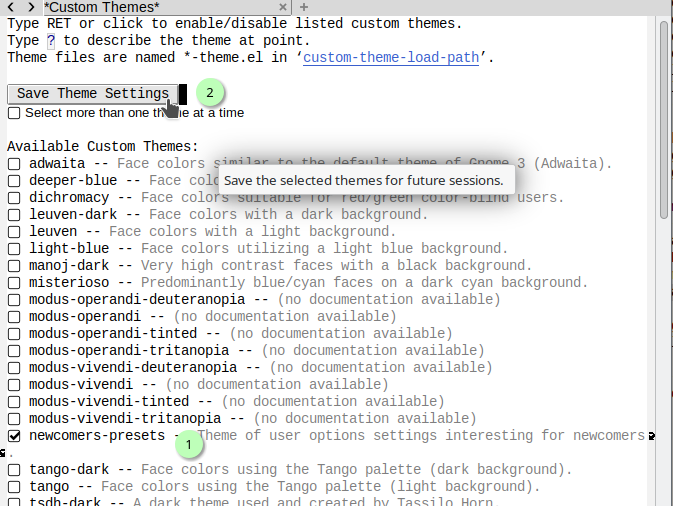
*图 2:保存主题设置*
我不确定是否已有人记录了它的具体作用,所以决定整理一下。
目前大多数 Emacs 新手尚未使用 Emacs 开发版本,但该主题最终会进入 Emacs 31。我在想,将其提取为一个独立包供用户通过 `use-package` 使用是否是个好主意。虽然不太确定是否应该用主题来实现这些功能,但这值得一试。
以下是 `newcomers-presets` 包含的功能列表。我也附上了对应的 Emacs Lisp 代码,以便你只需复制特定部分,或者你也可以获取完整的 copy-of-newcomers-presets.el (https://sachachua.com/blog/2026/04/what-s-in-the-emacs-newcomers-presets-theme/copy-of-newcomers-presets.el)。如果你想在现有 Emacs 中加载它,可以在你的初始化文件(https://www.emacswiki.org/emacs/InitFile)中添加 `(load-file "path/to/copy-of-newcomers-presets.el")`。你可以使用 `C-h f`(`describe-function`)或 `C-h v`(`describe-variable`)来了解更多关于它更改的函数或变量的信息。我是手动制作这个页面的,因此自 [2026-04-30 周四] 以来,`etc/themes/newcomers-presets-theme.el` (https://github.com/emacs-mirror/emacs/tree/master/etc/themes/newcomers-presets-theme.el) 可能已有一些变动。
```elisp
;; -*- lexical-binding: t -*-
;; 基于 https://github.com/emacs-mirror/emacs/tree/master/etc/themes/newcomers-presets-theme.el
```
### 编辑与导航 (https://sachachua.com/blog/2026/04/what-s-in-the-emacs-newcomers-presets-theme/#what-s-in-the-emacs-newcomers-presets-theme-editing-and-navigation)
当你通过按 `C-SPC`(`set-mark-command`)选择文本,然后移动到要选择文本的末尾,接着输入时,新文本会替换选中的内容。
```elisp
(setopt delete-selection-mode t)
```
在 Emacs 和其他应用程序之间复制时,效果更好。等同于:
```elisp
(setopt save-interprogram-paste-before-kill t)
```
如果你安装了兼容的拼写检查器(Hunspell (https://github.com/hunspell/hunspell)、Aspell (http://aspell.net/)、Ispell (https://www.cs.hmc.edu/~geoff/ispell.html) 或 Enchant (https://rrthomas.github.io/enchant/)),Emacs 将使用 `flyspell-mode` 检查你的拼写并为错误添加下划线。如果你安装了相应的字典,可以使用 `M-x ispell-change-dictionary` 来更改语言。在代码缓冲区中,拼写检查会应用于注释和字符串。你也可以使用 `flyspell-goto-next-error`(`C-,`)跳转到下一个拼写错误的单词,并使用 `flyspell-auto-correct-word`(`C-M-i`)来修正它。更多信息:拼写 (https://www.gnu.org/software/emacs/manual/html_node/emacs/Spelling.html) `(info "(emacs) Spelling")`。
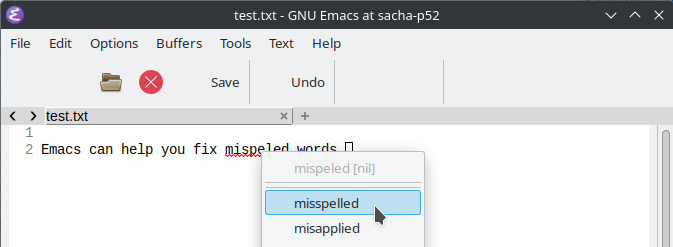
*图 3:波浪形红色下划线表示可能拼写错误的单词;右键点击它们可进行更正或添加到词典*
```elisp
(add-hook 'text-mode-hook 'flyspell-mode)
(add-hook 'prog-mode-hook 'flyspell-prog-mode)
```
Imenu 条目 (https://www.gnu.org/s/emacs/manual/html_node/emacs/Imenu.html) 会根据当前缓冲区或文件的结构自动更新(例如:大纲标题、函数名)。你可以通过 `M-x imenu` 列出它们,或通过 `M-x imenu-add-to-menubar` 将它们添加到菜单栏。
```elisp
(setopt imenu-auto-rescan t)
```
当你打开一个只读文件时,它将以视图模式打开,因此你可以使用 `SPC` 来滚动。这会影响你没有修改权限的文件缓冲区,以及你使用 `C-x C-q`(`read-only-mode`)设为只读的缓冲区。
```elisp
(setopt view-read-only t)
```
### 外观 (https://sachachua.com/blog/2026/04/what-s-in-the-emacs-newcomers-presets-theme/#what-s-in-the-emacs-newcomers-presets-theme-appearance)
滚动更加平滑,而不是按字符跳跃。
```elisp
(setq pixel-scroll-mode t)
```
在文本和代码缓冲区中均显示行号。
```elisp
(add-hook 'prog-mode-hook 'display-line-numbers-mode)
(add-hook 'text-mode-hook 'display-line-numbers-mode)
```
在模式行中显示列号。
```elisp
(setopt column-number-mode t)
```
如果你更改了系统范围的等宽字体,Emacs 也会动态更新系统定义的字体。
```elisp
(setopt font-use-system-font t)
```
你可以将帧或窗口调整为任意大小,而不会被限制为整字符步长。
```elisp
(setopt frame-resize-pixelwise t)
(setopt window-resize-pixelwise t)
```
即使更改字体、菜单栏、工具栏、标签栏、内部边框、 fringe 或滚动条,帧的大小也将保持不变。
```elisp
(setopt frame-inhibit-implied-resize t)
```
如果模式行比当前选定的窗口宽,它会通过将重复的空格替换为单个空格来压缩显示。
```elisp
(setopt mode-line-compact 'long)
```
### 在会话间保存数据 (https://sachachua.com/blog/2026/04/what-s-in-the-emacs-newcomers-presets-theme/#what-s-in-the-emacs-newcomers-presets-theme-saving-data-between-sessions)
Minibuffer 历史记录会在 Emacs 会话之间保存,因此你可以使用 `M-x`,然后使用 `M-p` 和 `M-n` 浏览历史记录。
你在文件中的位置会在 Emacs 会话之间保存。
```elisp
(setopt save-place-mode t)
```
你最近打开的文件会在 Emacs 会话之间保存,因此你可以使用 `M-x find-file` 和其他命令,然后使用 `M-p` 和 `M-n` 浏览历史记录。
### 补全 (https://sachachua.com/blog/2026/04/what-s-in-the-emacs-newcomers-presets-theme/#what-s-in-the-emacs-newcomers-presets-theme-completion)
这组选项影响补全候选项(当你按下 `M-x` 然后按 `TAB`,或在其他提示处使用 `TAB` 时出现的建议)。
你可以在 minibuffer 中使用方向键选择补全候选项,并使用 RET 选择高亮项。
```elisp
(setopt minibuffer-visible-completions t)
```
补全建议的附加详情会显示在建议之前或之后。例如,`M-x describe-symbol`(`C-h o`)会显示附加信息。
```elisp
(setopt completions-detailed t)
```
如果设置补全的函数指定了分组,补全候选项可以分组显示。
```elisp
(setopt completions-group t)
```
当你按 TAB 查看某个提示的补全候选项时(例如 `M-x` 然后 `TAB`),第一次 TAB 会显示补全列表,第二次 TAB 会选择缓冲区。
```elisp
(setopt completion-auto-select 'second-tab)
```
这个 Completions 缓冲区会随着你的输入而更新,以便你可以缩小候选项范围。
```elisp
(setopt completion-eager-update t)
```
设置了以下补全样式:
- basic:你可以输入候选项的开头。(例如:`abc` 会列出 `abcde` 和 `abcxyz`)
- partial-completion:你可以指定多个词,每个词都将被视为匹配候选项的前缀。例如,如果你输入 `a-b`,如果 `apple-banana` 是选项之一,它将匹配。
- emacs22:当你将光标移动到某些文本的中间然后补全时,光标前的文本用于过滤补全,光标后的文本会添加到结果的末尾。
更多信息:补全样式 (https://www.gnu.org/software/emacs/manual/html_node/emacs/Completion-Styles.html)
```elisp
(setopt completion-styles '(basic emacs22 flex))
```
自动根据光标位置显示补全预览。`TAB` 接受补全建议,`M-i` 补全最长公共前缀。
```elisp
(setopt global-completion-preview-mode t)
```
`TAB` 首先尝试缩进当前行。如果该行已缩进,Emacs 尝试补全光标处的内容。一些编程语言模式有自己的变量来控制此行为,例如 `c-tab-always-indent`,因此可能需要额外的自定义。
```elisp
(setopt tab-always-indent 'complete)
```
### 帮助 (https://sachachua.com/blog/2026/04/what-s-in-the-emacs-newcomers-presets-theme/#what-s-in-the-emacs-newcomers-presets-theme-help)
如果你在输入快捷键的第一部分后稍作停顿(例如 `C-c`),Emacs 将显示你可以继续使用的快捷键。
```elisp
(setopt which-key-mode t)
```
### 标签栏 (https://sachachua.com/blog/2026/04/what-s-in-the-emacs-newcomers-presets-theme/#what-s-in-the-emacs-newcomers-presets-theme-tab-bar)
标签栏始终显示。标签让你可以保存一个或多个窗口的排列方式,以及在这些窗口中显示的缓冲区。你可以点击标签或使用 `M-x tab-switch` 切换到该配置,或者点击 `+` 号或使用 `M-x tab-new` 添加另一个标签。更多信息:标签栏 (https://www.gnu.org/software/emacs/manual/html_node/emacs/Tab-Bars.html) `(info "(emacs) Tab Bars")`

*图 4:标签栏显示在缓冲区顶部。*
标签会在 Emacs 会话之间保存。
```elisp
(setopt tab-bar-history-mode t)
```
### Dired 文件管理器 (https://sachachua.com/blog/2026/04/what-s-in-the-emacs-newcomers-presets-theme/#what-s-in-the-emacs-newcomers-presets-theme-the-dired-file-manager)
当你再次访问一个目录时,Dired 缓冲区会自动刷新。
```elisp
(setopt dired-auto-revert-buffer t)
```
你可以在 Dired 中使用鼠标拖动文件。Ctrl+左键拖动复制文件,Shift+左键拖动移动文件,Meta+左键拖动创建链接。你也可以在 X11、Haiku、Mac OS 和 GNUstep 上将文件拖动到其他应用程序。
```elisp
(setopt dired-mouse-drag-files t)
```
在提示输入 shell 命令时显示当前目录。这会影响 `shell-command` 和 `async-shell-command`。
```elisp
(setopt shell-command-prompt-show-cwd t)
```
### 包管理 (https://sachachua.com/blog/2026/04/what-s-in-the-emacs-newcomers-presets-theme/#what-s-in-the-emacs-newcomers-presets-theme-package-management)
如果你打开一个 Emacs 在 GNU ELPA (https://elpa.gnu.org/) 或 NonGNU ELPA (https://elpa.nongnu.org/nongnu/) 中有可选包提供额外支持的文件,Emacs 会在模式行添加 **[Upgrade?]** 以便更轻松地安装相应的包。

*图 6:包自动建议功能会在你打开一个 Emacs 有可选包可用的文件时,在模式行添加“Upgrade?”*
```elisp
(setopt package-autosuggest-mode t)
```
当你使用 `M-x list-packages` 时,`x`(`M-x package-menu-execute`)现在需要你先选择一些内容,而不是默认对当前包执行操作。按 `i`(`package-menu-mark-install`)标记一个包待安装,按 `d`(`package-menu-mark-delete`)标记一个包待删除,按 `u`(`package-menu-mark-unmark`)取消标记一个包,按 `x`(`package-menu-execute`)执行操作。
```elisp
(setopt package-menu-use-current-if-no-marks nil)
```
### 代码 (https://sachachua.com/blog/2026/04/what-s-in-the-emacs-newcomers-presets-theme/#what-s-in-the-emacs-newcomers-presets-theme-code)
在代码缓冲区中,Emacs 将使用 `flymake-mode` 显示错误和警告。
```elisp
(add-hook 'prog-mode-hook 'flymake-mode)
```
如果你使用 `M-x compile`,`*compilation*` 窗口将在新输出出现时滚动,但它会在第一个错误处停止,以便你更容易调查。
```elisp
(setopt compilation-scroll-output 'first-error)
```
你可以 Ctrl+左键点击一个函数名,使用 `xref-find-definitions-at-mouse` 跳转到其定义。
```elisp
(setopt global-xref-mouse-mode t)
```
Emacs 将自动插入匹配的括号、方括号和花括号。
```elisp
(setopt electric-pair-mode t)
```
在缩进代码时,Emacs 通常使用空格而不是制表符。
```elisp
(setopt indent-tabs-mode nil)
```
如果存在项目特定的 .editorconfig 文件,Emacs 将遵循这些设置。(关于 EditorConfig 的更多信息 (https://editorconfig.org/))
```elisp
(setopt editorconfig-mode t)
```
当你保存文件时,标签表会自动重新生成。这使用 Etags (https://www.gnu.org/s/emacs/manual/html_node/emacs/Create-Tags-Table.html) 以便更容易地跳转到函数或变量的定义。
### 版本控制 (https://sachachua.com/blog/2026/04/what-s-in-the-emacs-newcomers-presets-theme/#what-s-in-the-emacs-newcomers-presets-theme-version-control)
```elisp
(setopt etags-regen-mode t)
```
如果文件已被你的版本控制系统更新,它们会从磁盘重新加载。
```elisp
(setopt vc-auto-revert-mode t)
```
如果一个目录在版本控制中发生了变化,但你有一些已修改的文件,Emacs 会询问你是否要保存这些已更改的文件。
```elisp
(setopt vc-dir-save-some-buffers-on-revert t)
```
如果你使用 `vc-find-revision` 转到文件的特定版本,它将显示在一个临时缓冲区中,不会替换你当前拥有的副本。
```elisp
(setopt vc-find-revision-no-save t)
```
如果你打开一个指向受版本控制文件的符号链接,Emacs 将打开真实文件并显示一条消息。这样,它仍然会处于版本控制之下。
```elisp
(setopt vc-follow-symlinks t)
```
`C-x v I` 和 `C-x v O` 现在有额外的快捷键。例如,`C-x v I L` 是 `vc-root-log-incoming`,`C-x v O L` 是 `vc-root-log-outgoing`。使用 `C-x v I C-h` 和 `C-x v O C-h` 查看其他命令。
```elisp
(setopt vc-use-incoming-outgoing-prefixes t)
```
自动为所有缓冲区确定版本控制系统。(标准 Emacs 仅在 dired、shell、eshell 或 compilation-mode 缓冲区中检查它。)
```elisp
(setopt vc-deduce-backend-nonvc-modes t)
```
### 我尚未弄清楚的功能 (https://sachachua.com/blog/2026/04/what-s-in-the-emacs-newcomers-presets-theme/#what-s-in-the-emacs-newcomers-presets-theme-things-i-haven-t-been-able-to-figure-out-yet)
在 Linux(X11)、Haiku 或 macOS / GNUstep 上:当缓冲区有关联的文件名时,你可以从模式行拖动文件名并将其拖放到其他程序中。(我未能让它正常工作。)
```elisp
(setopt mouse-drag-mode-line-buffer t)
```
«YE24:Sacha与Prot探讨Emacs新手入门工具包
相似文章
Emacs 31 即将到来:我日常使用的变化
Emacs 31 即将到来,带来了更简单的 tree-sitter 配置和内置的 markdown-ts-mode 等改进。本文详细介绍了作者在开发分支中使用的一些特性,强调了配置工作量的减少。
Emacs 31.1 的新特性
Emacs 31.1 已发布,带来了一些小幅使用体验优化,包括弃用了旧的 unexec/pdumper 系统,以及新增功能,如用户 Lisp 目录和增强的 minibuffer 补全。
我已在日常使用的 Emacs 31 变更
Emacs 31 引入了 tree-sitter 的改进,简化了语法安装,并新增了一个内置的 markdown-ts-mode。作者一直在开发分支上日常使用这些变更。
Emacs 31: Markdown-ts-mode 非官方指南
一本关于在 Emacs 31 中设置和使用实验性的 Markdown-ts-mode 的非官方指南,涵盖其功能、安装和使用技巧。
Emacs 31.1 已发布
Emacs 31.1,这款最新的可扩展文本编辑器,已经发布并可从 GNU 镜像下载。