DOOMQL

Simon Willison's Blog Tools

Summary

Peter Gostev built a Doom-like game using SQLite as the game engine, with ray tracing via recursive CTE, and integrated with Datasette for a real-time web interface. The project was created using GPT-5.6 Sol and demonstrates the creative potential of using SQL for game logic.

No content available
Original Article
View Cached Full Text

Cached at: 07/13/26, 11:54 PM

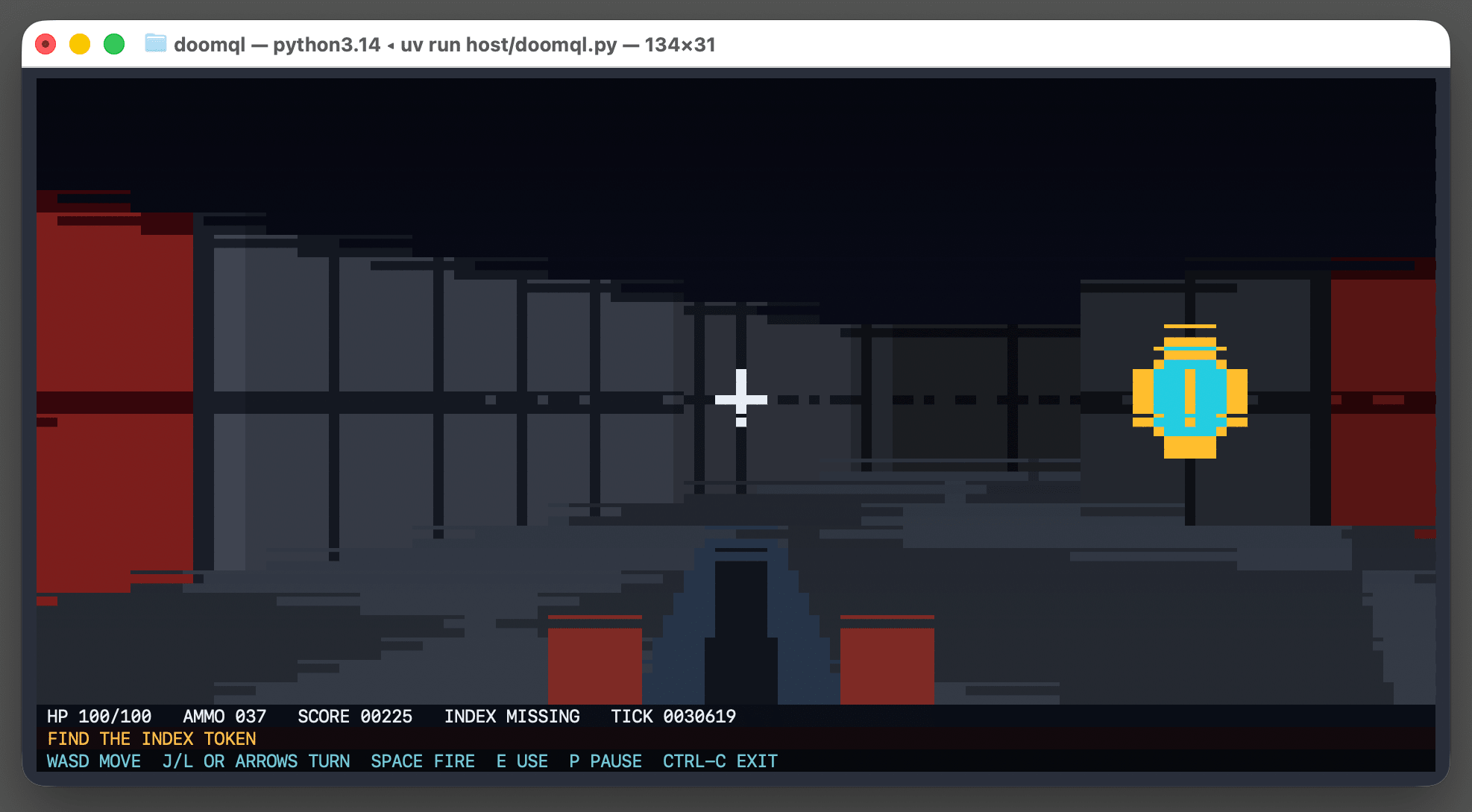
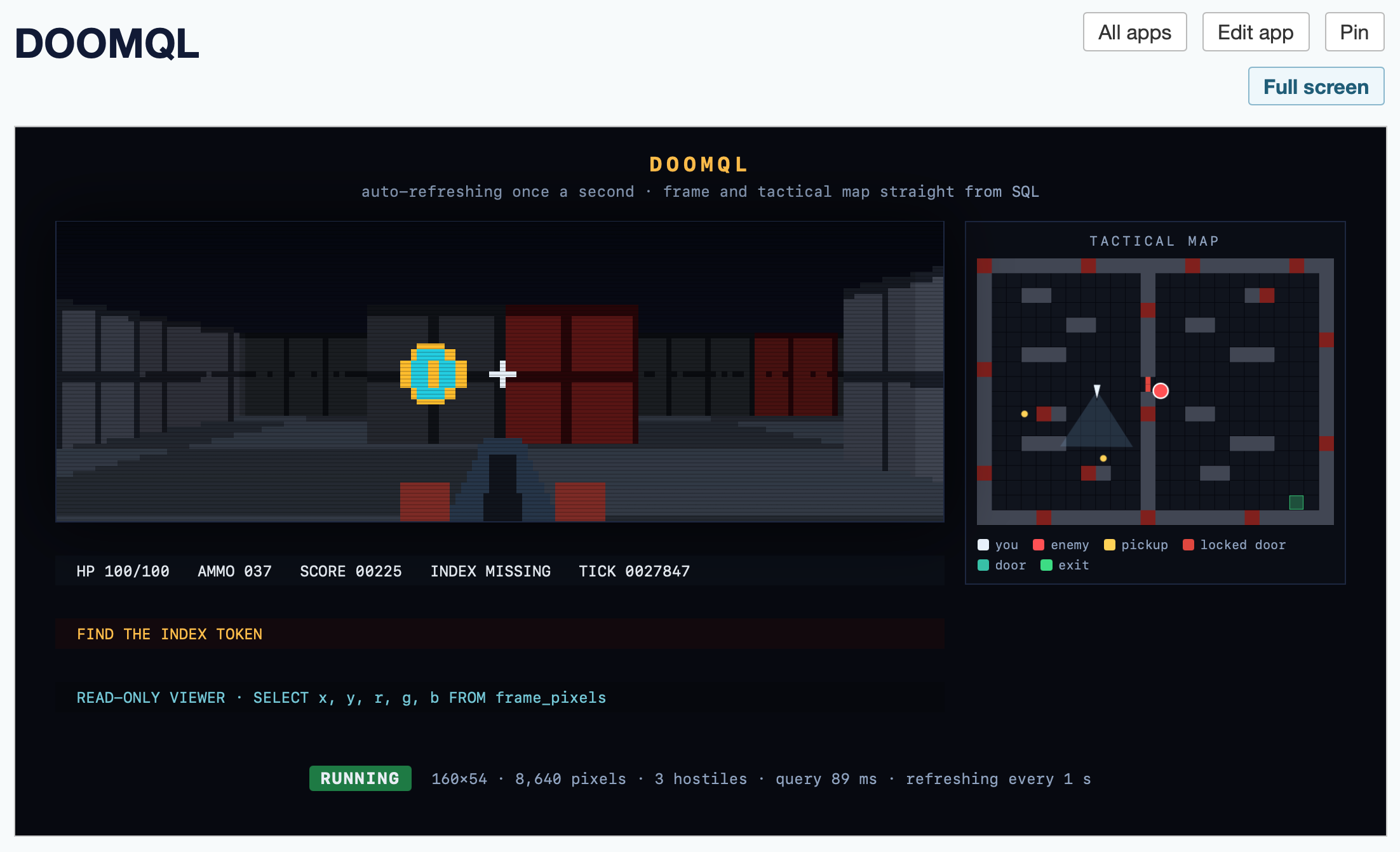
# DOOMQL Source: [https://simonwillison.net/2026/Jul/13/doomql/](https://simonwillison.net/2026/Jul/13/doomql/) 13th July 2026 \- Link Blog **[DOOMQL](https://github.com/petergpt/doomql)**\([via](https://twitter.com/petergostev/status/2076692164310884468)\) Peter Gostev built this using GPT\-5\.6 Sol\. This is a*lot*of fun: > DOOMQL started with a deliberately unreasonable question: what if SQLite were the game engine, not merely the place where a game stores data? The result is a small, original Doom\-like game in which SQL owns movement, collision, enemies, combat, progression and every RGB pixel on screen\. It's implemented as a Python terminal script \- I tried it out like this: ``` cd /tmp git clone https://github.com/petergpt/doomql cd doomql uv run host/doomql.py ``` ![Screenshot of a macOS terminal window titled "doomql — python3.14 ◂ uv run host/doomql.py — 134×31" showing a retro Doom-style game rendered as text-mode pixel art. The scene is a pixelated first-person corridor with gray paneled walls, dark red doors on the far left and right, a floating cyan-and-gold coin pickup on the right side, a white crosshair near the center, and a dark weapon barrel rising from the bottom center. A status bar below the scene reads "HP 100/100 AMMO 037 SCORE 00225 INDEX MISSING TICK 0028450", followed by an orange line "FIND THE INDEX TOKEN" and a cyan controls line "WASD MOVE J/L OR ARROWS TURN SPACE FIRE E USE P PAUSE CTRL-C EXIT".](https://static.simonwillison.net/static/2026/doomql-window.png) Here's[the huge SQL query](https://github.com/petergpt/doomql/blob/main/sql/003_render.sql)that implements a full ray tracer in SQLite using a recursive CTE\. Running the above script creates a`/tmp/doomql/\.doomql/doomql\.sqlite`SQLite database, which you can explore using Datasette like this: ``` uvx --prerelease=allow --with datasette-apps datasette \ /tmp/doomql/.doomql/doomql.sqlite \ -p 4444 --root --secret 1 --internal internal.db ``` The`\-\-with datasette\-apps`option installs the new[Datasette Apps](https://simonwillison.net/2026/Jun/18/datasette-apps/)plugin, which supports creating custom HTML\+JavaScript apps that can run SQL queries directly within the Datasette interface\. I created a new app, pasted the copy\-paste prompt into Claude chat \(Fable 5\)[and told it](https://claude.ai/share/c793280c-2ef1-4555-a7c2-31281abfdf78): > `Build an app that displays the current state of the screen using the frame\_pixels view with its x, y, r, g, b columns\. have it refresh once a second\.` This got me a working HTML\+JavaScript app inside Datasette that could reflect the current state while I played the game in my terminal\. Then I added: > `add a minimap` And now my Datasette App looks like this: ![Screenshot of a dark-themed web app running a retro Doom-style game rendered from SQL queries. The page header reads "DOOMQL" with buttons "All apps", "Edit app", "Pin", and "Full screen". Inside the game panel, the title "DOOMQL" sits above the subtitle "auto-refreshing once a second · frame and tactical map straight from SQL". The left side shows a pixelated first-person corridor view with gray walls, dark red doors, a floating cyan-and-gold coin pickup, a white crosshair, and a weapon barrel at bottom center. A status bar below reads "HP 100/100 AMMO 037 SCORE 00225 INDEX MISSING TICK 0027847". On the right, a panel titled "TACTICAL MAP" shows a top-down grid map with a player triangle, a red enemy circle, yellow pickup dots, red wall markers, and a green exit square, with a legend reading "you", "enemy", "pickup", "locked door", "door", "exit". Below the game view, an orange banner reads "FIND THE INDEX TOKEN", followed by the cyan line "READ-ONLY VIEWER · SELECT x, y, r, g, b FROM frame_pixels". At the bottom, a green "RUNNING" badge appears beside the stats "160×54 · 8,640 pixels · 3 hostiles · query 89 ms · refreshing every 1 s".](https://static.simonwillison.net/static/2026/doomql-datasette-app.png) Here's[the HTML app code](https://gist.github.com/simonw/7c78184476fccd4b70b02f7f9048dffa)\- paste that into your own Datasette instance \(using the`uvx \-\-with datasette\-apps`recipe from above\) to try it yourself\.
Similar Articles

Someone got Doom in an SQL database

Ars Technica

Lukas Vogel's SQLDoom project renders full-color 640×480 Doom frames at 35 FPS using an SQL database, with game logic implemented in about 1,300 lines of SQL across 89 common table expressions, building on his earlier DoomQL project.

We ported the original Doom to SQL

Hacker News Top

CedarDB ported the original 1993 Doom's game logic and BSP-based renderer entirely into SQL queries, running the game loop at 35 FPS with a full playable deathmatch demo inside the database.

Introducing DoomBench - Can Your Data Stack Run DOOM?

Lobsters Hottest

CedarDB introduces DoomBench, a benchmark that runs a multiplayer DOOM-like game in pure SQL to stress-test data stacks across analytical and transactional workloads, providing直观 visual performance comparisons.

DOOM running on a regex engine

Lobsters Hottest

A developer demonstrates running the game DOOM using a regex engine as a computational substrate, performing millions of substitutions per frame.

56,000 lines of DOOM, in a language I made up

Hacker News Top

The author built a joke programming language called bet that compiles via LLVM, uses arena-based memory management, and successfully runs the full DOOM game (56,000 lines) without code review, relying only on tests.