@yibie: 推荐这篇,Hamel Husain——世界上最懂 AI eval 的实践者之一——说了一句话:"这东西很难评估"本身就是一个产品气味。 如果你不给用户提供可检查的中间产物,他们就会重做一遍你的工作来验证输出。那你的产品对他们的价值是什么?…
摘要
文章推荐并总结了Hamel Husain的博客,指出“难评估”本身是产品设计缺陷,应优先设计便于用户验证的产品,并通过AI数据分析agent、教案生成器和工伤报告三个案例说明如何通过提供可检查的中间产物来提升产品价值。
查看缓存全文
缓存时间: 2026/07/06 12:12
推荐这篇,Hamel Husain——世界上最懂 AI eval 的实践者之一——说了一句话:“这东西很难评估“本身就是一个产品气味。 如果你不给用户提供可检查的中间产物,他们就会重做一遍你的工作来验证输出。那你的产品对他们的价值是什么?
“这东西很难评估“是一个产品气味
我在 AI eval 上做了三年。最常听到的反对是“我们的产品很难评估“。这个反对本身就是一个产品气味——对你来说难验证的东西,对用户也难。
更重要的事:设计一个易于验证的产品,应该在写 eval 之前。
例 1:AI 数据分析 agent
几乎所有公司都在建内部分析 agent。问他一个业务问题,他找数据源、跑查询、给答案。目的是降低对数据分析师的依赖。
最常见的错误:把“答案“作为唯一的输出。
界面上只有一个数字——“Product A 上季度净收入:$4.21M”。用户除了重新做一遍之外没有其他方式验证。更好的设计不是隐藏过程,而是给用户可检查的 artifact。
一个数据分析师验证指标时会做六件事:对照可信源检验中间计算过程和总量数字、确认指标精确定义、检验相关量的合理性、拆开聚合数字按维度分解、读 SQL、记录无法验证的部分。
一个好的 AI 数据分析 agent 应该做同样的事——在回答里展示来源、假设和无法验证的问题。用户可以点击打开一个 Notebook 查看完整分析:agent 做的假设、跑的查询、按地区的分解分布、显式列出“无法验证的部分“,每一项都作为可运行的 cell 保留,让用户可以继续深挖。
这对 eval 意味着什么
如果你的产品设计成便于验证,标注成本就会降低,eval 会有更好的信号可以抽取。更重要的是,你会给用户一个更好的产品。
例 2:PE 教案生成器
一个创始人做的产品:老师输入约束(年级、时长、室内/室外、器材),AI 写一份教案。
“怎么评估教案好坏?”——Hamel 把问题反过来了:老师在意什么? 最快的方式是看到“一个和你一样的老师已经用过的教案“。一个好的设计:不是从零生成教案,而是从一个被审核过的、14 所学校在用、今年跑了 30+ 次的可信教案出发,然后只展示改了哪几处——“缩短到 45 分钟,改热身从 2 圈到 1 圈”“匹配你的器材,4 站变 3 站”。老师审核的不是一个完整教案,而是一个 diff——认知负荷大幅降低。eval 也变得更可追踪:只需要验证检索出的教案是否合理,以及每个修改是否遵守约束。
例 3:工伤医学报告
一个产品从病历(MRI、理疗记录、体检报告)生成 50 页专家意见。问题是:医生要对报告负责,所以他们会重新读一遍全部病历、逐条核查——用时和从零写一份一样长。产品没价值。
Hamel 建议把产品做成研究助手而不是报告生成器。先读每份病历,提取相关事实,附上链接让医生可以核查。两份检查意见矛盾?标出来。影像资料缺失到现在状态不确定?标出来。事实审查完毕后,“生成报告“按钮才出现——报告由已经核查过的事实组装而成。
这样设计让每个单元可以独立评分:这个矛盾是真的吗?这个引用支持这个主张吗?
这个模式可以泛化
问这四个问题:用户实际需要检查什么?他们能和什么可信的东西对比?专家用什么信号或启发式做验证?哪些更小的单元可以被接受、编辑或拒绝?
一条贯穿所有例子的线索是来源。让输出可检查的最快方式,是展示每个部分从哪里来,带上链接查看细节。用渐进式披露让这些来源不会压垮用户。
即使一个产品看起来“容易评估“(比如你写出了能跑通的代码),最优秀的产品仍然在让工作更可检查——Cursor 和 Devin 都录制 UI 变更的短视频,让你确认工作的正确性而不需要自己复现。
这些都不是新东西
这些都是老的设计原则——观察专家的领域叫 needfinding,医疗诊断里的结构化理解叫 sensemaking。但在 AI 时代前,验证通常发生在创建产品的过程中,是附带的。在 AI 时代,验证是瓶颈。 是时候更显式地思考它了。
原文:Hamel Husain, ““It’s Hard to Eval” Is a Product Smell“, 2026-06-29 https://hamel.dev/blog/posts/eval-smell/…
#AI产品 #Eval #产品设计
“It’s Hard to Eval” Is a Product Smell – Hamel’s Blog
Source: https://hamel.dev/blog/posts/eval-smell/ For the past 3 years, AI evals have been my professional focus.1The most common objection I hear to evals is “our product is hard to eval”.
This objection is a product smell. Artifacts that are hard for you to verify are often hard for users too. In the worst case, users have to redo the work from scratch to verify the output. More importantly, designing your product for ease of verification should come before building evals.
In this post, I’ll walk through three products I advised on that faced this issue. I’ll also show before and after sketches to demonstrate design principles. After these examples, I’ll discuss how to apply this general pattern to your product.
Example 1: the AI data agent
Almost every company I’ve worked with builds an internal AI data agent. You ask it a business question, like what was net revenue for Product A last quarter, and it finds relevant data sources, runs the queries, and provides an answer. The goal of this agent is to reduce dependency on data analysts.
A common mistake when building AI data agents is to make the answer the only output, as illustrated below.
Data Agent
What was net revenue for Product A last quarter?
Net revenue for Product A last quarter was**$4.21M**.
Ask anything about your business…➤
Since the only output is the answer, there is nothing here to check.
In the sketch above, the user has no way to verify the answer beyond redoing work.2A better design is to provide the user with checkable artifacts, informed by how a domain expert might validate the output. Here are techniques I use to validate metrics as a data scientist:
- Compare the quantity and any intermediate calculations against a trusted source, like a vetted dashboard or report, or a similar analysis a colleague has already vetted.3
- Confirm the metric definition precisely. A number like net revenue can include or exclude things like returns and discounts.
- Sanity-check a related quantity. If I can’t verify the number directly, I pull a related number that should move with it, like units sold or unique customers, and check if the combination is plausible.
- Look at what is beneath the aggregate. A total can hide problems, so I break it down by dimensions like region or time period and sanity-check the distribution.
- Read the query. For an important number I look at the SQL to confirm it does what I think, and I tweak it and rerun to test my assumptions.
- Note anything I could not verify. If a step has no trusted reference to check it against, I flag it instead of presenting it as settled.
Here’s what a better interface might look like. The two tabs below show the same answer at two levels of detail. The chat reply surfaces the details worth seeing up front, and the notebook holds the full analysis behind the answer. Use the tabs to switch between them.
- Chat
- Notebook
Data Agent
What was net revenue for Product A last quarter?
Net revenue for Product A last quarter was**$4.21M**.ⓘ
The agent surfaces the important details behind the answer. Select the Notebook tab above to see the full analysis generated by the agent.
This is the notebook the agent worked in while producing its answer. Scroll within the figure to see all the cells. The sidebar has a Contents tab for jumping between sections and an Assistant tab for asking follow-ups.
net_revenue_product_a.ipynb▶ Run all↑ Publish
Contents✦Assistant
1Metric definition2Net revenue3By region4Open items!New thread✕
What was net revenue for Product A last quarter?
✦
I pulled Product A’s net revenue from the order lines using finance’s governed definition, broke it out by region, and flagged what I couldn’t verify. The cells are on the left.
**✓**Generated the cells in this notebook
Ask a follow-up…
SQL [2]Auto ▾↑
The notebook reads top to bottom: the assumptions the agent made, the queries it ran, and an explicit list of what it could not verify.
There is a lot to unpack here. Here are notable changes:
- The agent optionally performs retrieval from vetted analyses, and the interface shows which one was used along with who authored it.
- There is progressive disclosure of details. The chat reply shows high value items like sources, assumptions, and issues. The user can optionally open an interactive notebook to see the full context.
- The AI-generated notebook (see notebook tab above) is organized to promote verification: it opens with the assumptions the agent made, like the metric definition and where it came from, then shows the queries it ran and the numbers they returned. It breaks the total down so you can sanity-check the distribution, and it closes with a list of what it could not verify, each item left as a cell you can run.
- The AI agent is also available in the notebook to help with follow-ups. Finally, the user can publish the notebook back to a knowledge base, where it can be retrieved by future analyses, creating a virtuous cycle.
This design sketch is far from perfect. The point is that the product should help the user verify the answer as a domain expert would. Compare it to the earlier approach, where the only output was the number.
Data agents like these are not science fiction. Hex4is my favorite product in this genre; it integrates notebooks and chat better than anything I’ve seen. Here are screenshots from their landing page:
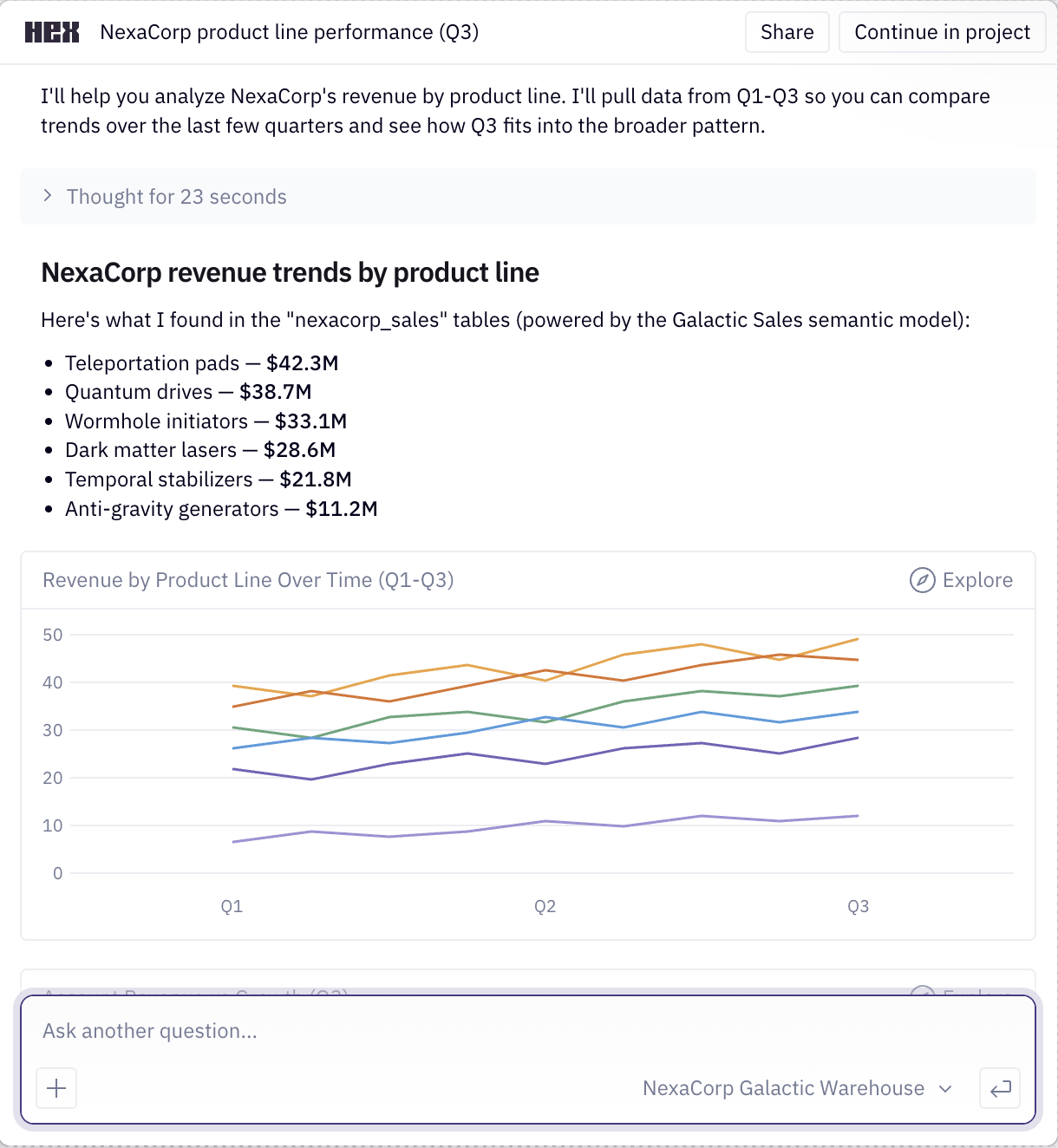
Chat interface.
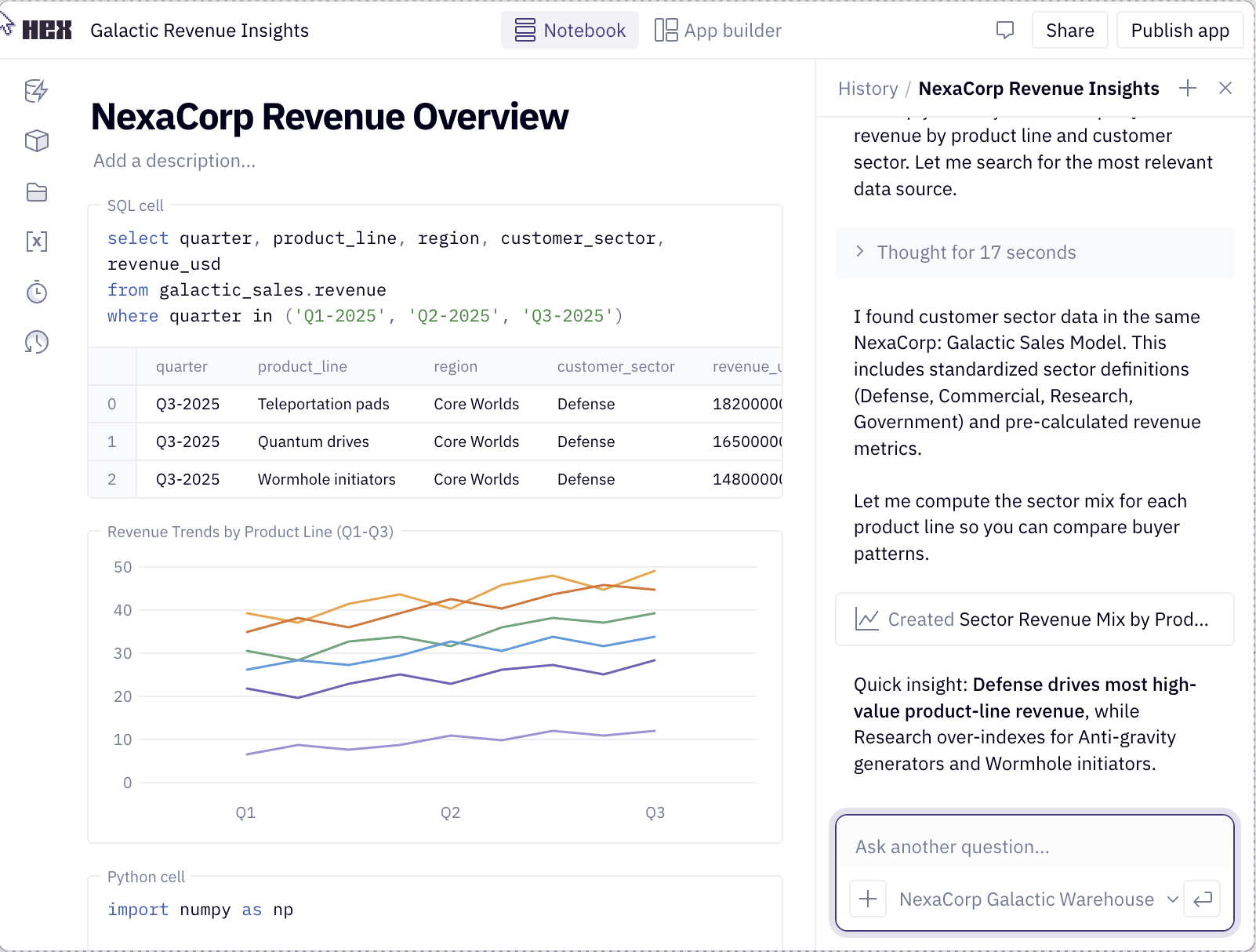
Notebook view which allows the user to see the intermediate steps and data.
But what does this have to do with evals? If you design your product for verification, annotation becomes less expensive and evals will have better signals to draw from. More importantly, you’ll provide your users with a better product.
Example 2: the PE curriculum builder
A founder I advised was building an AI tool that writes physical education lesson plans for K-12 teachers. A teacher enters their constraints, like the grade they teach, how long the class is, whether it meets indoors or outdoors, and what equipment they have. The tool then writes a lesson plan for those constraints. The goal is to save teachers the time they spend planning and give them a plan that fits their class. Here is a sketch of what the product looks like:
PE Planner
Class details
GradeGrade 4▾
Class length45 minutes▾
LocationOutdoors▾
Equipment12 cones, 6 balls
Generate lesson plan
The teacher enters constraints and the tool writes a plan from scratch. The only output is the plan, so its difficult to verify.
The founder asked me how to eval the lesson plans. I turned the question around:what does a teacher care about?
The fastest way to trust a plan is to see that a teacher like them already uses it. Additionally, teachers value visibility into what others are doing so they can learn new approaches. Therefore, a better design might start from vetted lesson plans that are actively used in schools. When the tool generates a plan, it shows which vetted plan it started from, who uses that plan, and a diff of what it changed for this teacher’s constraints.
Next, the teacher can check a small set of changes against a plan they already trust, instead of judging a whole plan from scratch. Here’s a sketch of what a better interface might look like:
PE Planner
DRAdapted from Dana Ruiz’s plan
Grade 4 PE · Lincoln Elementary, Austin TX
Used at 14 schoolsRun 30+ times this yearAligned to SHAPE standards
What changed · 2 editsAccept allReject all
1Warm-up
−Jog 2 laps, then dynamic stretches (10 min)
+Jog 1 lap, then dynamic stretches (8 min)
Shortened to fit a 45-minute class
Accept⌘⏎Reject⌘⌫
2Main activity
−4 stations, 8 balls, hoops as targets
+3 stations, 6 balls, cones as targets
Matched to your equipment
Accept⌘⏎Reject⌘⌫
The plan is anchored to a vetted plan another teacher uses. The changes are marked so the teacher can check a diff against a plan they trust.
In this version, most of the plan is inherited from a vetted plan. The teacher’s review is scoped to a few edits, each with a reason explaining why the change was made. This is a more efficient way to review a plan because it reduces the cognitive load of judging a whole plan from scratch.
Designing for this makes the product simpler to build. Instead of stuffing hundreds of examples into a prompt, the tool captures important dimensions, retrieves a close match, and adapts it. Automated evals now become tractable because there is less surface area to test. For example, you can verify that the plan retrieval picked a sensible anchor, and each edit honors the constraints.
Example 3: the workers-comp medical report
The last example comes from a workers’ compensation tool a founder asked me to help with. It reads a patient’s chart (intake forms, imaging reports, therapy notes, prior exams) and generates a long expert opinion report, often fifty pages or more. Here is a sketch of the product:
ClaimDraft–□✕
Source records · 18
Intake questionnaire
MRI, lumbar spine
X-ray report
Physical therapy notes
Treating physician notes
Prior IME
Work restrictions
+ 11 more
ClaimantJ. DoeClaim#WC-20259417Date of injuryMar 3, 2025ExaminerDr. A. Patel
Independent Medical Evaluation
Permanent & Stationary Report
1. History of injury
The claimant is a 47-year-old warehouse associate who reports a lumbar spine injury on March 3, 2025 while lifting a carton estimated at sixty pounds. He describes immediate low back pain radiating into the right lower extremity, followed by numbness along the lateral calf.
2. Review of records
Records reviewed include the intake questionnaire, an MRI of the lumbar spine dated March 18, 2025, twelve physical therapy notes, and the treating physician’s progress reports through August 2025.
3. Physical examination
On examination, lumbar flexion was limited to 40 degrees with pain. Straight leg raise was positive on the right at 50 degrees. Strength was 4 of 5 in the right extensor hallucis longus, with diminished sensation in the L5 distribution.
4. Diagnoses
Lumbar disc herniation at L5-S1 with associated right L5 radiculopathy, supported by the imaging and examination findings above.
5. Causation analysis
Within reasonable medical probability, the disc herniation is causally related to the industrial lifting event of March 3, 2025. The claimant had no documented history of lumbar treatment prior to that date.
Page 1 of 52Generated from 18 records
The only output is a fifty-page narrative. To trust it, the doctor has to re-read the whole chart and check every claim, which can take as long as writing the report from scratch.
The problem is the same as the other examples, but the stakes are higher. The only output is the report, and the doctor is the one accountable for it. To trust it they have to go back through the chart and confirm the facts and inferences themselves. That can take as long as writing the report from scratch, which defeats the point of the tool.
You might object that a fifty-page opinion is hard to verify. That is true, and the product should not pretend otherwise. Helping a doctor understand the evidence is arguably more valuable than the finished document. Therefore, I advised the founder to make the product work like a research assistant instead of a report generator.
For example, the product could read every record and pull out relevant facts, with a link back to the page so the doctor can check each one. Where two exams disagree, or the chart leaves a question open, the product should surface that. The doctor can then resolve any contradictions and fill in the gaps. Finally, the product can assemble the final report from what they have already checked. Here is a sketch of what this might look like:
ClaimDraft–□✕
ClaimantJ. DoeClaim#WC-20259417Date of injuryMar 3, 2025ExaminerDr. A. Patel
Records · 18
MRI, lumbar spine✓
Physical therapy notes✓
Treating physician notes✓
Prior IME○
Intake questionnaire○
X-ray report○
9 of 18 reviewed
1Contradiction
Straight-leg-raise is recorded as positive on the right by the treating physician (p. 31) and negative by the prior IME (p. 22).
2Key fact
The intake form notes a prior lumbar strain in 2019, which bears on causation (p. 14).
IncludeDismiss
3Open question
No imaging appears in the file after March 18, 2025, so the current status of the herniation is unconfirmed.
Add a note
4Key fact
The MRI report describes pre-existing degenerative changes at L4-L5 (p. 9).
IncludeDismiss
6 of 24 findings still need reviewGenerate report draft
The product walks the doctor through the evidence first, surfacing each finding with a link back to the chart. Afterwards, the final report is built from the facts they reviewed.
The research assistant version of this product allows the doctor to build trust by verifying facts as they go. Similar to the other examples, this design is easier to build and evaluate. Now there are scoped units to grade, such as whether a contradiction is real or whether a citation supports a claim.
Generalizing the pattern
It is important to understand how users verify your product’s AI artifacts. Sometimes, this may require assembling supporting evidence. In other cases, it could mean refactoring the entire workflow so that the user is in the loop (like the workers’ comp example).
Below are questions that can guide your product’s design for verification:
- What does the user actually need to check?
- What trusted thing can they compare it against?
- Are there signals or heuristics that experts use to aid in verification?
- What smaller units can they accept, edit, or reject?
A common thread across these examples is provenance. The fastest way to make an output checkable is to show where each part came from, with links to see more detail. Additionally, you can use progressive disclosure so these sources don’t overwhelm the user.
What needs verifying also changes as the user’s trust grows. Early on, the data agent should make provenance obvious, like where a metric definition came from. Once the user trusts the agent gets it right, that detail can collapse by default in the card. Good design meets users where they are instead of showing everything.
These principles hold even when a product seems easy to eval. Coding is a good example: it is one of the most verifiable kinds of work, with tests, types, and diffs. Even so, some coding agents go the extra mile to make their work checkable. Cursor and Devin both record a short video of the UI changes they make, so you can confirm the work is right without reproducing it yourself.5
None of this is new
Evals thinking is aligned with good product design. Gathering supporting data and breaking down workflows into smaller units makes automated grading easier. However, I don’t want to pretend like any wisdom here is new.
All of these ideas stem from well-established design principles. For example, watching an expert work to learn what they check before you build is called needfinding.6In research-heavy work like the medical case, there is a design goal called sensemaking, which is the work of building a structured understanding of a body of evidence you can reason over.7There are many other concepts, but I think you get the idea.
Even though these ideas are well established, a reminder is due in the age of AI. Before AI, verification often happened incidentally during the process of creating work product. With AI, verification is the bottleneck. It is time to think about it more explicitly.
Thanks toShreya ShankarandIsaac Flathfor feedback on this post.
To stay updated on my writing on AI evals, subscribe to my newsletter below.
Footnotes
- More of my writing and teaching on evals:Your AI Product Needs Evals,A Field Guide to Rapidly Improving AI Products,Using LLM-as-a-Judge for Evaluation,LLM Evals: Everything You Need to Know,Selecting the Right AI Evals Tool,Evals Skills for Coding AgentsandThe Revenge of the Data Scientist. I also co-teach theAI Evals for Engineers & PMscourse and co-authored the O’Reilly bookEvals for AI Engineers.↩︎
- Lenny Rachitsky tweeted about this recently: most of one data science team’s work is now reviewing half-baked AI analysis from PMs and engineers, and half of it is wrong.↩︎
- When I worked at Airbnb we had an internal tool called theKnowledge Repo, a place where data scientists published notebooks of their deep dives on analytics, modeling, and so on (they wrote about it here). It was one of the fastest ways to get context on a new project, since you could read what someone had already worked out. I don’t know if it is still in use, but the paradigm is a good one.↩︎
- Bryan Bischofled the creation of the AI atHex. Bryan is a data scientist himself, the kind of domain expert the product serves, and I think that is part of why it is designed well.↩︎
- See ademo of Cursorrecording its UI changes, andDevin’s documentationon testing and recordings.↩︎
- Dev Patnaik and Robert Becker,“Needfinding: The Why and How of Uncovering People’s Needs”, Design Management Journal.↩︎
- Daniel M. Russell, Mark J. Stefik, Peter Pirolli, and Stuart K. Card,“The Cost Structure of Sensemaking”.↩︎
相似文章
@yibie: https://x.com/yibie/status/2102619356874117594
本文讨论了AI系统中评估(evals)的重要性,解释了为什么传统测试不够用,介绍了三种主要评估类型,并提供了实施建议。
@shao__meng: https://x.com/shao__meng/status/2102648813425135777
本文总结了来自 Hamel Husain 和 Shreya Shankar 的 AI Evals 课程的 8 个核心技能,旨在指导工程师和产品经理构建有效的 AI 评测系统,涵盖错误分析、评测器设计、校准和监控等步骤。
@businessbarista: 观点偏激:评测(evals)是阻碍企业成为 AI-native 的头号因素。想搞懂评测,就读这篇……
文章主张评测(evals)是企业成为 AI-native 的最大障碍,并给出了 eval-driven development 的指南:定义好的行为、对 agent 进行测试、将失败案例转化为回归测试,并介绍了 grader、case、run、trace 四个核心概念以及确定性检查、参考答案比对等四种打分方式。
@LangChain: "Validate your validators." The eval advice nobody is following. Watch @sh_reya + @HamelHusain’s Interrupt keynote on t…
文章总结了AI评估中的常见错误,强调验证验证器、设计具体指标、严格实验设计等,呼吁回归数据科学思维,提升AI系统评估可靠性。
@sermakarevich:智能体评估:如何判断 AI 智能体是否完成了任务,以及能否再次完成
一篇面向工程师的深度文章,系统讲解如何对 LLM 智能体进行评估:通过检查可验证的最终状态而非回复文本来判定任务是否完成,并区分能力(capability)与可靠性(reliability)两个指标,同时定位失败步骤、判断模型评审的可信度。