@yibie: Recommending this article on AI product design by Geoffrey Litt (Design Engineer at Notion). He unearthed a striking claim from a 1992 talk by Mark Weiser: 33 years ago, people were already criticizing the "copilot" metaphor as the worst interface design for AI.

X AI KOLs Timeline News

Summary

Recommends Geoffrey Litt's article criticizing the AI 'copilot' metaphor, advocating for a HUD (Heads-Up Display) design philosophy that makes AI a background awareness tool rather than a conversational assistant.

Recommending this article on AI product design by Geoffrey Litt (Design Engineer at Notion). He unearthed a striking claim from a 1992 talk by Mark Weiser: 33 years ago, people were already criticizing the "copilot" metaphor as the worst interface design for AI. Weiser didn't say AI shouldn't help people—he said AI shouldn't be a "helper" role. It should be a HUD—letting you naturally perceive what you need to know, rather than a virtual person you need to ask for help in a conversation. Geoffrey cites spell checkers and custom debuggers as examples of "HUDs"—tools that don't talk to you but give you new senses. Enough AI copilots! We need AI HUDs I think one of the best critiques of modern AI design comes from a 1992 talk by researcher Mark Weiser—he was already trashing the "copilot" metaphor for AI back then. It was an event at MIT Media Lab about "interface agents." They were wrestling with the same problems we discuss in 2025: how to make a personal assistant that automates tasks for you and knows your full context. They even had a human "butler" on stage to represent the AI agent. Everyone was thrilled… Except Weiser. He opposed the entire concept of an agent. He used the example of flying a plane—how should computers help pilots avoid collisions? The "agent" option is a "copilot"—a virtual person you can talk to for help. If about to collide with another plane, it might yell at you, "Collision, right and down!" Weiser offered another answer: design the cockpit so the human pilot naturally perceives the environment. In his words: "You don't crash into another plane—just like you don't try to walk through a wall." Weiser's goal was "invisible computing"—not a helper that grabs your attention, but a computer that fades into the background and becomes "an extension of your body." So what is a HUD? With Weiser's direction, we have a term: HUD (Heads-Up Display). In games, a HUD lets you perceive critical game state—health, map, ammo—without pausing to study a menu. A good HUD makes you stronger as a player without interrupting your actions. This starkly contrasts with today's AI copilots: stop what you're doing, open a sidebar, type something, wait for a response. What does a HUD look like today? A familiar example is spell check. Think about it: a spell checker isn't designed as a "virtual collaborator" discussing spelling with you. It just puts a red wavy underline immediately when you misspell—you now have a new sense you didn't have before. That's a HUD. Another example is AI for coding. An obvious "copilot" approach is to open an agent chat and ask it to fix a bug. But I've found another approach that is sometimes more powerful: using AI to build a custom debugger UI that visualizes my program's behavior! In the debugger, I have a HUD—I have new senses; I can see how my program runs. HUD and Agent are not contradictory Weiser's 1992 talk opposed agents themselves. But I don't think we need to go that far. Chatbot interfaces are actually great for many use cases—when you really want conversation. The problem is: we only have chatbots. That's why Weiser's criticism still stings—it points to the poverty of imagination in mainstream AI design. We've spent almost all our effort perfecting one thing—talking to an AI buddy—without asking, "Is this the best?" Original: https://geoffreylitt.com/2025/07/27/enough-ai-copilots-we-need-ai-huds.html… #AIProductDesign #InteractionDesign #HUD
Original Article
View Cached Full Text

Cached at: 07/13/26, 03:57 PM

I recommend this article on AI product design by Geoffrey Litt (design engineer at Notion). He unearthed a startling claim from a 1992 talk by Mark Weiser: 33 years ago, someone was already calling “copilot” the worst interface metaphor for AI. Weiser wasn’t saying AI shouldn’t help people—he was saying AI shouldn’t be an “assistant.” It should be a HUD—letting you naturally perceive what you need to know, rather than being a virtual person you have to ask for help in a conversation. Geoffrey uses spellcheck and custom debuggers as examples of “HUDs”—tools that aren’t trying to talk to you, but instead give you new senses.

Enough AI copilots! We need AI HUDs.

I think one of the best criticisms of modern AI design comes from a 1992 talk by researcher Mark Weiser—he was already ranting about “copilot” as a metaphor for AI back then.

It was at an MIT Media Lab event on “interface agents.” They were grappling with the same issues we’re discussing in 2025: how to build a personal assistant that automates tasks for you and knows your full context. They even had a human “butler” on stage representing the AI agent. Everyone was super excited…

Except Weiser. He opposed the whole concept of agents. He gave the example of flying a plane: how should a computer help a pilot avoid collisions?

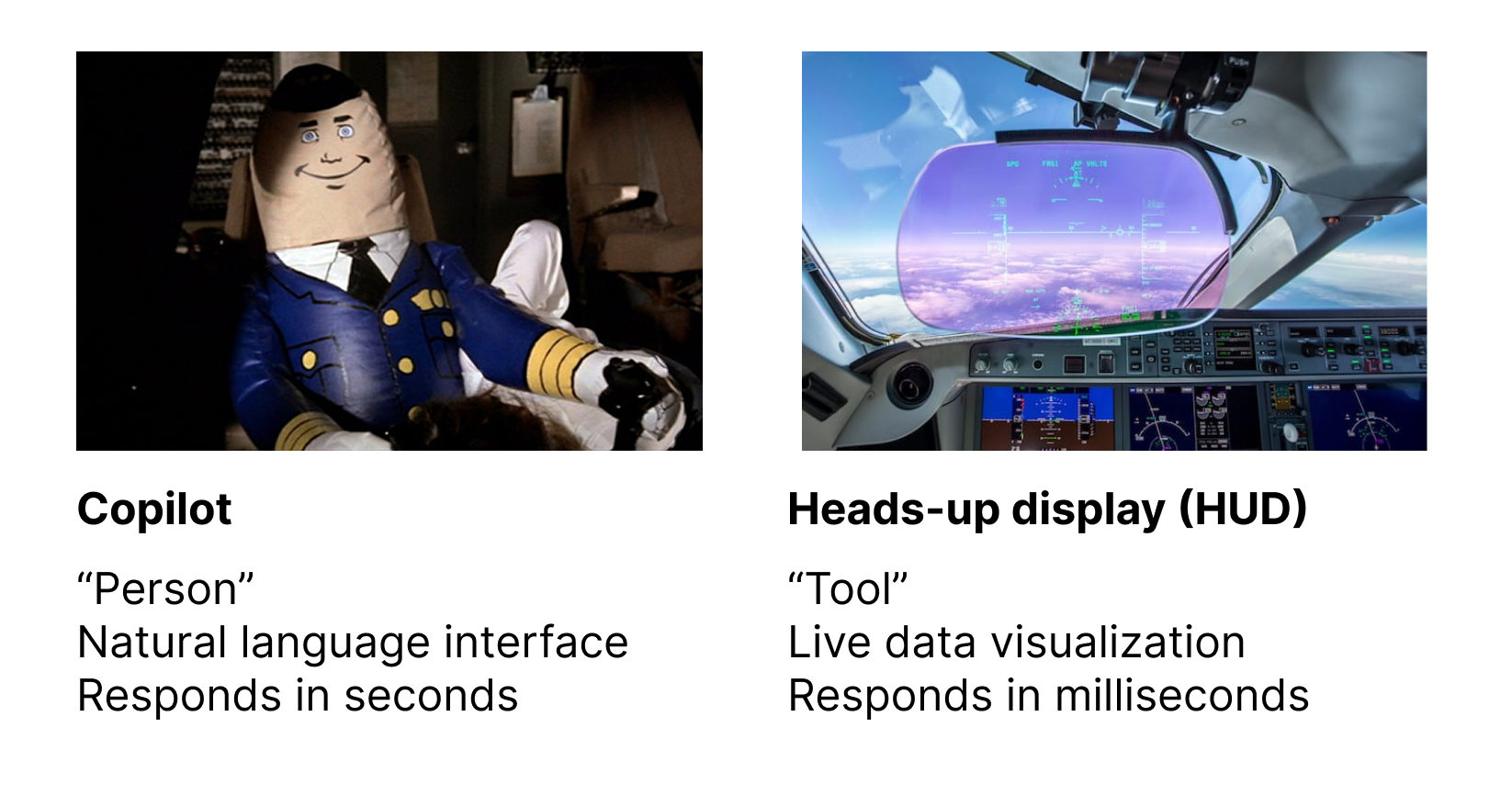
The “agent” option is a “copilot”—a virtual person you can talk to for help. If you’re about to hit another plane, it might yell at you “Collision, go right and down!”

Weiser offered an alternative: design the cockpit so the human pilot naturally perceives their surroundings. In his words: “You’ll no more run into another airplane than you would try to walk through a wall.”

Weiser’s goal was an “invisible computer”—not an assistant that grabs your attention, but a computer that fades into the background and becomes “an extension of your body.”

What is a HUD?

With Weiser’s direction, we have a term: HUD (Heads-Up Display). In games, a HUD lets you perceive key game state—health, map, ammo—without pausing to dig into a menu. A good HUD makes you more powerful as a player without interrupting your actions.

This is in stark contrast to today’s AI copilots: stop what you’re doing, open a sidebar, type some text, wait for a response.

What does a HUD look like today?

A familiar example is spellcheck. Think about it: spellcheck isn’t designed as a “virtual collaborator” that discusses spelling with you. It just instantly puts a red squiggly line under misspelled words—you now have a new sense you didn’t have before. That’s a HUD.

Another example from AI coding. The obvious “copilot” approach is to open an agent chat and ask it to fix a bug. But I’ve found another approach that’s sometimes more powerful: use AI to build a custom debugger UI that visualizes how my program behaves! In the debugger, I have a HUD—I have new senses, I can see how my program runs.

HUDs and agents aren’t contradictory

Weiser’s 1992 talk was against agents altogether. But I don’t think we have to go that far. Chatbot interfaces are actually great for many use cases—when you really want a conversation. The problem is: we only have chatbots.

That’s why Weiser’s criticism still stings—it points out the poverty of imagination in mainstream AI design. We’ve spent nearly all our effort perfecting one thing—talking to an AI companion—without asking, “Is this the best way?”

原文: https://geoffreylitt.com/2025/07/27/enough-ai-copilots-we-need-ai-huds.html…

#AI产品设计 #交互设计 #HUD


Enough AI copilots! We need AI HUDs

Source: https://www.geoffreylitt.com/2025/07/27/enough-ai-copilots-we-need-ai-huds.html In my opinion, one of the best critiques of modern AI design comes froma 1992 talk (https://cgi.csc.liv.ac.uk/~coopes/comp319/2016/papers/UbiquitousComputingAndInterfaceAgents-Weiser.pdf)by the researcherMark Weiser (https://en.wikipedia.org/wiki/Mark_Weiser)where he ranted against “copilot” as a metaphor for AI.

This was 33 years ago, but it’s still incredibly relevant for anyone designing with AI.

Weiser’s rant

Weiser was speaking at anMIT Media Lab event (https://www.dropbox.com/scl/fo/axpzd925tcsnkc9x5nd51/AJMdLqxafEYFun4Ns6fqMHo?dl=0&e=1&preview=frames_1992_014_Nov.pdf&rlkey=znit21hyth8w24m6gm02rq2y7)on “interface agents”. They were grappling with many of the same issues we’re discussing in 2025: how to make a personal assistant that automates tasks for you and knows your full context. They even had a human “butler” on stage representing an AI agent.

Everyone was super excited about this… except Weiser. He was opposed to the whole idea of agents! He gave this example: how should a computer help you fly a plane and avoid collisions?

The agentic option is a “copilot” — a virtual human who you talk with to get help flying the plane. If you’re about to run into another plane it might yell at you “collision, go right and down!”

Weiser offered a different option:design the cockpit so that the human pilot is naturally aware of their surroundings. In his words: “You’ll no more run into another airplane than you would try to walk through a wall.”

Weiser’s goal was an “invisible computer”—not an assistant that grabs your attention, but a computer that fades into the background and becomes “an extension of [your] body”.

Weiser’s 1992 slide on airplane interfaces## HUDs

There’s a tool in modern planes that I think nicely illustrates Weiser’s philosophy:the Head-Up Display (HUD), which overlays flight info like the horizon and altitude on a transparent display directly in the pilot’s field of view.

A HUD feels completely different from a copilot! You don’t talk to it. It’s literally part invisible—you just become naturally aware of more things, as if you had magic eyes.
Designing HUDs

OK enough analogies. What might a HUD feel like in modern software design?

One familiar example is spellcheck. Think about it:spellcheck isn’t designed as a “virtual collaborator” talking to you about your spelling. It just instantly adds red squigglies when you misspell something! You now have a new sense you didn’t have before. It’s a HUD.

(This example comes from Jeffrey Heer’s excellentAgency plus Automation (https://idl.cs.washington.edu/files/2019-AgencyPlusAutomation-PNAS.pdf)paper. We may not consider spellcheck an AI feature today, but it’s still a fuzzy algorithm under the hood.)

Spellcheck makes you aware of misspelled words without an “assistant” interface.Here’s another personal example from AI coding. Let’s say you want to fix a bug. The obvious “copilot” way is to open an agent chat and ask it to do the fix.

But there’s another approach I’ve found more powerful at times:use AI to build a custom debugger UI which visualizes the behavior of my program! In one example, I built a hacker-themed debug view of a Prolog interpreter (https://www.geoffreylitt.com/2024/12/22/making-programming-more-fun-with-an-ai-generated-debugger).

With the debugger, I have a HUD! I have new senses, I can see how my program runs. The HUD extends beyond the narrow task of fixing the bug. I can ambiently build up my own understanding, spotting new problems and opportunities.

Both the spellchecker and custom debuggers show that automation / “virtual assistant” isn’t the only possible UI. We can instead use tech to build better HUDs that enhance our human senses.

Tradeoffs

I don’t believe HUDs are universally better than copilots! But I do believeanyone serious about designing for AI should consider non-copilot form factors that more directly extend the human mind.

So when should we use one or the other? I think it’s quite tricky to answer that, but we can try to use the airplane analogy for some intuition:

When pilots just want the plane to fly straight and level, they fully delegate that task to an autopilot, which is close to a “virtual copilot”. But if the plane just hit a flock of birds and needs to land in the Hudson, the pilot is going to take manual control, and we better hope they have great instruments that help them understand the situation.

In other words: routine predictable work might make sense to delegate to a virtual copilot / assistant. But when you’re shooting for extraordinary outcomes, perhaps the best bet is to equip human experts with new superpowers.


Further reading

  • A nice discussion of one approach to this idea can be found inUsing Artificial Intelligence to Augment Human Intelligence (https://distill.pub/2017/aia/)by Michael Nielsen and Shan Carter.
  • A more cryptic take on the same topic:Is chat a good UI for AI? A Socratic dialogue (https://www.geoffreylitt.com/2025/06/29/chat-ai-dialogue)
  • A discussion of how the the HUD philosophy intersects with on-demand software creation:Malleable software in the age of LLMs (https://www.geoffreylitt.com/2023/03/25/llm-end-user-programming)

Similar Articles

@hwwaanng: https://x.com/hwwaanng/status/2053830423331865077

X AI KOLs Timeline

The article analyzes why Anthropic designed the new UI for the Claude Code desktop app to be more minimalist and restrained, noting that this is to accommodate the visual blind spots of AI agents, reduce cognitive noise to enhance collaborative efficiency, and explores the reconstruction of aesthetic standards in the era of human-machine collaboration.

@nash_su: A must-read—Jakob Nielsen (founder of Nielsen Norman Group and UX legend) on UX design in the AI era. I distilled his long-form insights into Chinese for easy reading; original link at the end. Many ideas he covers already pop up in great products, but no one has assembled them into a single dominant solution yet.

X AI KOLs Timeline

Jakob Nielsen’s deep dive into AI-era UX design, condensed into Chinese, spotlights concepts scattered across top products but not yet unified in one leading solution.

@grapeot: Why Have We Been Giving AI Agents the Wrong Interface? Nearly all AI coding and agent tools default to chat windows (e.g., Cursor, Claude Code). But from an efficiency standpoint, this WeChat/Slack-inspired interaction is severely limiting AI...

X AI KOLs Timeline

The article criticizes the prevalent use of chat windows as the interface for AI programming tools, arguing that this design restricts the autonomous working ability of AI from both the user and developer ends, and proposes a shift to an asynchronous, task-driven collaboration model.

@yibie: Recommend this article that gave me chills. A developer recalls a professor 25 years ago saying "Lisp is the language of AI," and then he wrote a complete agent in 100 lines of Common Lisp—8 lines of recursive agent loop, one tool being e…

X AI KOLs Timeline

A developer built an AI agent in 100 lines of Common Lisp, with the only tool being eval. The model executes code through a recursive agent loop and restores skills via a persisted transcript, showcasing Lisp's unique advantage as an AI language.

@yibie: Recommend this: Hamel Husain—one of the world's most experienced AI eval practitioners—said: "It's hard to evaluate" is itself a product smell. If you don't provide users with inspectable intermediate artifacts, they'll redo your work to verify the output. Then what value does your product bring them?...

X AI KOLs Timeline

The article recommends and summarizes Hamel Husain's blog, pointing out that "hard to evaluate" is inherently a product design flaw. It advocates prioritizing the design of products that are easy for users to verify, and illustrates through three cases—an AI data analysis agent, a lesson plan generator, and a workplace injury report—how providing inspectable intermediate artifacts enhances product value.