@svpino: When you finish your research, you can package the whole session as a .science file. This file will contain the convers…
Summary
AIPOCH Open-Science 推出 .science 文件格式,可将整个研究会话(对话、代码、输入与证据)打包为可移植的研究交接包,支持协作者审查、检查点保留与工作区迁移。
View Cached Full Text
Cached at: 10/14/26, 08:02 PM
When you finish your research, you can package the whole session as a .science file. This file will contain the conversation, code, inputs, and evidence. Here is the link explaining Open-Science: https://aipoch.com/blog/aipoch-open-science-research-packages… Protein Measurements case: https://aipoch.com/open-science/use-cases/protein-measurements-do-the-ratios-add-up…
AIPOCH Open-Science .science: Research Handoff Guide
Source: https://aipoch.com/blog/aipoch-open-science-research-packages
A colleague opens your final chart. Their first question is simple:**“How did you get this result?”**Answering it may require the input dataset, the code that ran, the conversation where you changed an assumption, and the output version you actually reviewed.
AIPOCH Open-Science brings that context into a portable \.science** research package.**Export a session with its conversation branches, selected files, and recorded evidence, then import it into another project or computer for inspection.
The imported record stays read-only. In v0.32.0, you can fork it into a writable continuation or start a separate normal session that references the imported history. Either route requires checking the files, dependencies, services, and permissions needed for further work. See thev0.32.0 limitations.
This guide is for researchers handing an analysis to a collaborator, preserving a review checkpoint, or moving a session between projects or computers.
What is a .science file in AIPOCH Open-Science?
A\.sciencefile is Open-Science’s portable research-session format. It packages saved conversation context, available supporting records, and selected file contents so another researcher can inspect how the work developed.
The transfer unit is a research session. Its contents can help connect a question to the inputs, execution records, and results associated with it, while preserving the branches through which the investigation progressed.
The feature first shipped inv0.29.0.v0.30.1subsequently added selected literature PDFs to session packages.
This guide was checked against v0.32.0 and public documentation on September 23, 2026. The screenshots show earlier demonstration sessions; their filenames, sizes, and surrounding conversations are examples.
Why research handoffs need context
A final report communicates a conclusion. A useful handoff also helps the next researcher locate the work behind it.
Consider a figure prepared for a lab meeting. Your collaborator may want to know which input version you used, whether the code completed, why one analysis branch was abandoned, and which checks apply to the displayed result. Sending the figure alone leaves those questions open.
A\.sciencepackage gives the recipient a starting point: the conversation explains decisions, the included files provide materials to inspect, and the captured evidence connects outputs to recorded work.
This supports three practical workflows:
- **Collaborator review:**share an analysis with a specific question about its assumptions, methods, or results.
- **Research checkpoints:**retain the record associated with a figure, report, or intermediate decision before starting another stage.
- **Workspace transfers:**bring a session’s saved history into another project or computer and prepare the next phase there.
The sender’s most useful contribution is a clear review question. “Check the preprocessing behind figure version 3” gives the recipient a more actionable starting point than “Here is my project.”
What can a .science research package contain?
Package contents depend on what the session recorded, what remains available, and your export selection.
MaterialContribution to the handoffWhat to checkConversation history and branchesResearch questions, decisions, and alternative directionsIdentify the branch relevant to the reviewUploaded files and artifact versionsInputs, outputs, and their version relationshipsConfirm the necessary file contents are includedNotebook and execution recordsEvidence of recorded computational workMatch the run and inputs to the selected resultProvenance and verification recordsAvailable links between results and recorded checksRead the version and scope of each checkCaptured environment locksDependency evidence associated with supported workCheck availability before planning restorationLiterature metadata and selected PDFsSources used in the sessionInspect which PDF contents will travelOptional file contents and required evidence are handled separately. Selecting fewer files does not erase their mentions from the saved conversation, and evidence dependencies can make a file mandatory. The releasedcontent-selection implementationenforces these distinctions.
Use the preview to answer a practical question: will the recipient have the materials needed for this particular review?
Choose the right export: .science, PDF, Markdown, or ZIP
Choose the format according to what your collaborator needs to do.
Recipient’s goalExport to useRead the conversation as a documentConversation PDFEdit or reuse conversation textConversation MarkdownWork with selected output filesIndividual downloads or an artifact ZIPInspect branches, files, and recorded evidence together in Open-Science\.scienceresearch packageA collaborator preparing a presentation may only need the final figure. Someone investigating the analysis behind it benefits from the session package. A short report alongside that package can provide an overview and identify where to begin.
Open-Science also provides a distinct artifact-level option:v0.32.0’s complete RO-Crate exportpackages a verified artifact version with its exact inputs, usingRO-Crate 1.1. This has a different scope from a\.sciencesession package and does not constitute complete session replay.
How to export a .science package
1. Finish the work you want to hand over
Wait until the session is idle. Complete or stop its active work, including relevant Task or Compute activity. The releasedexport checksprevent exporting while associated Task or Compute work remains active.
Save a short handoff note in the conversation or a report. Identify the result, relevant branch or version, and next question. Side Chat conversations and private reading bookmarks and their notes are excluded from package exports, so put essential context somewhere that will travel.
Open the Session menu and select Export → Export Session package.
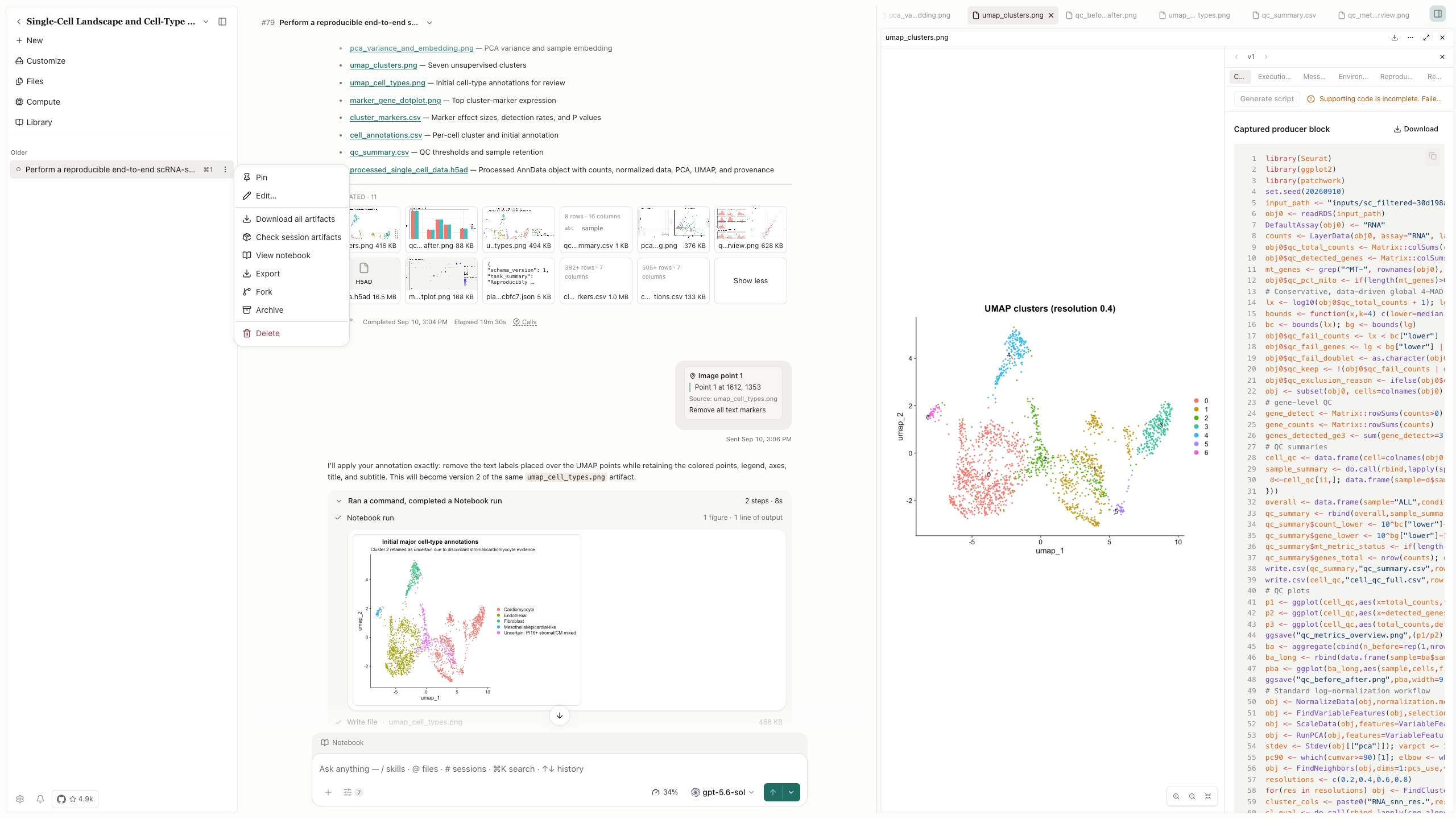
Figure 1. A completed single-cell analysis session in AIPOCH Open-Science. Open the Session menu and choose Export → Export Session package to prepare a\.sciencehandoff. The visible files, annotations, and UMAP output illustrate research context that should be reviewed before selecting package contents.
3. Compare Essential export and Full export
Essential exportretains research history and required evidence while omitting optional content.Full exportselects the available file contents within the supported package scope.Customize contentslets you inspect individual files and versions and adjust optional selections.
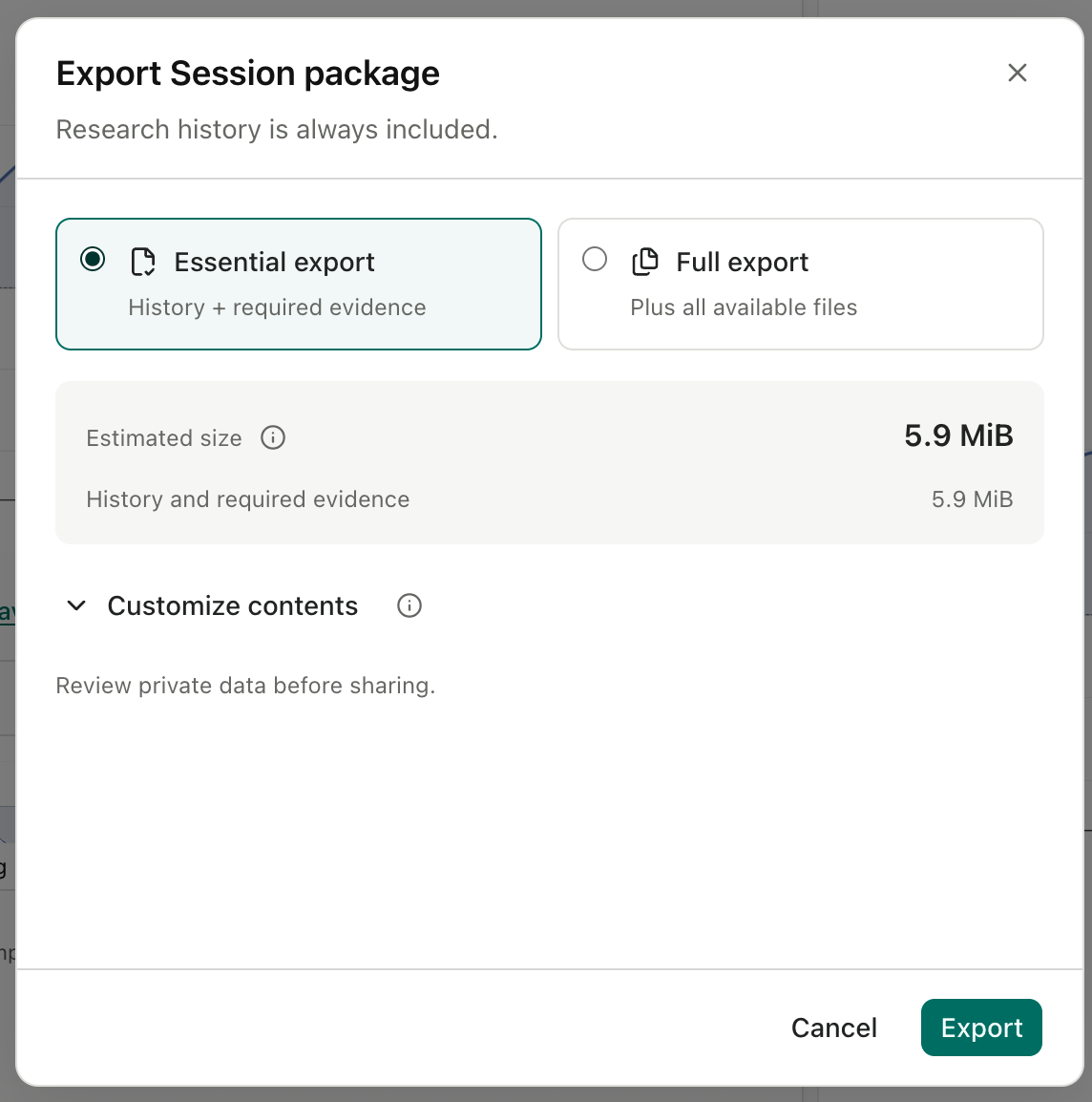
Figure 2. The export dialog shows presets, content controls, and an estimated size. The displayed 5.9 MiB belongs to this demonstration.
For literature, the selection rules are:
- Literature metadata is always included.
- Essential export omits optional literature PDFs.
- Full export includes available literature PDFs; Customize contents allows individual selection.
- If a literature PDF is required evidence, Essential export is unavailable. Use Full export or a custom selection that retains it.
These rules are documented in theofficial package guideand reflected in thev0.32.0 export interface implementation. Full export does not fetch missing full texts or remove size limits.
For a focused review, choose the smallest selection that preserves the necessary materials. For a broader handoff, include relevant inputs and output versions alongside the main result. Review the contents rather than relying on the preset name alone.
4. Save the package and wait for completion
Confirm your selection, choose a destination, and save the file with a recognizable name, such asfigure\-review\-2026\-09\-23\.science.
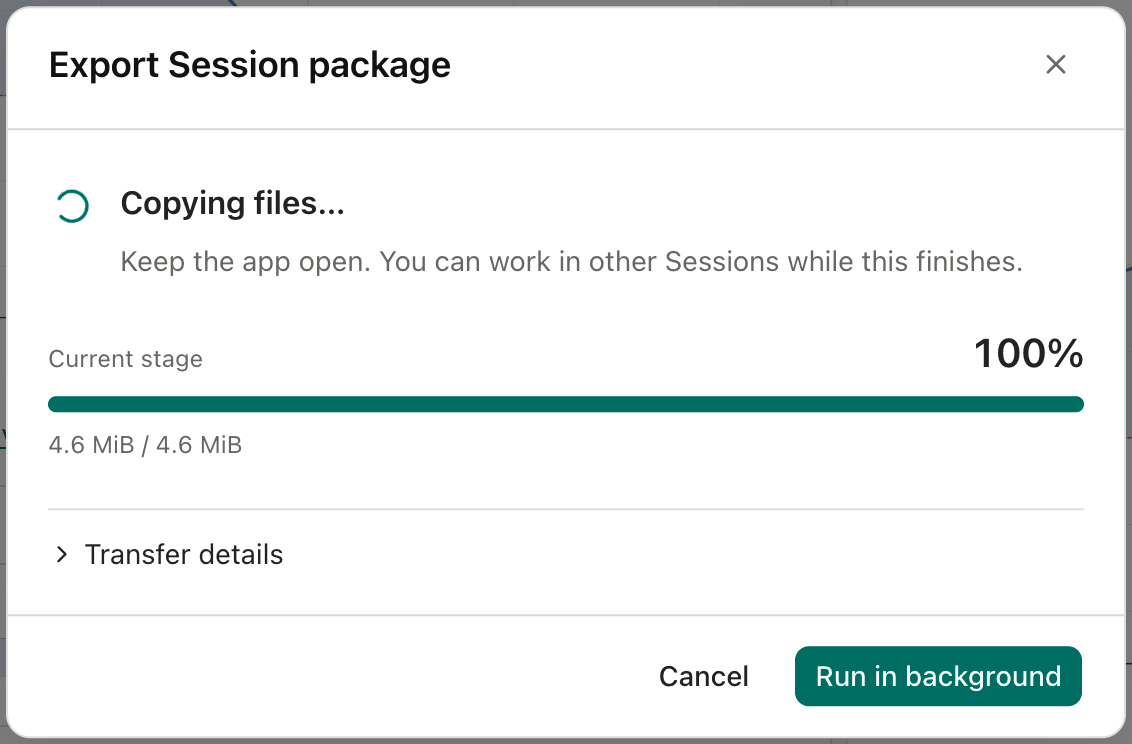
Figure 3. “Copying files” at 100% describes the current stage, not necessarily completion of the entire export.
Keep the app open during the transfer.Run in backgroundhides the progress window while work continues;Cancelstops the operation. After completion, useShow in folderto locate the package.
How to import a .science file into another project
Open the destination Project menu and choose **Import Session package…**. Alternatively, drop a\.sciencefile into the project. When file association is registered, opening the file directly starts the import workflow and asks for a destination.
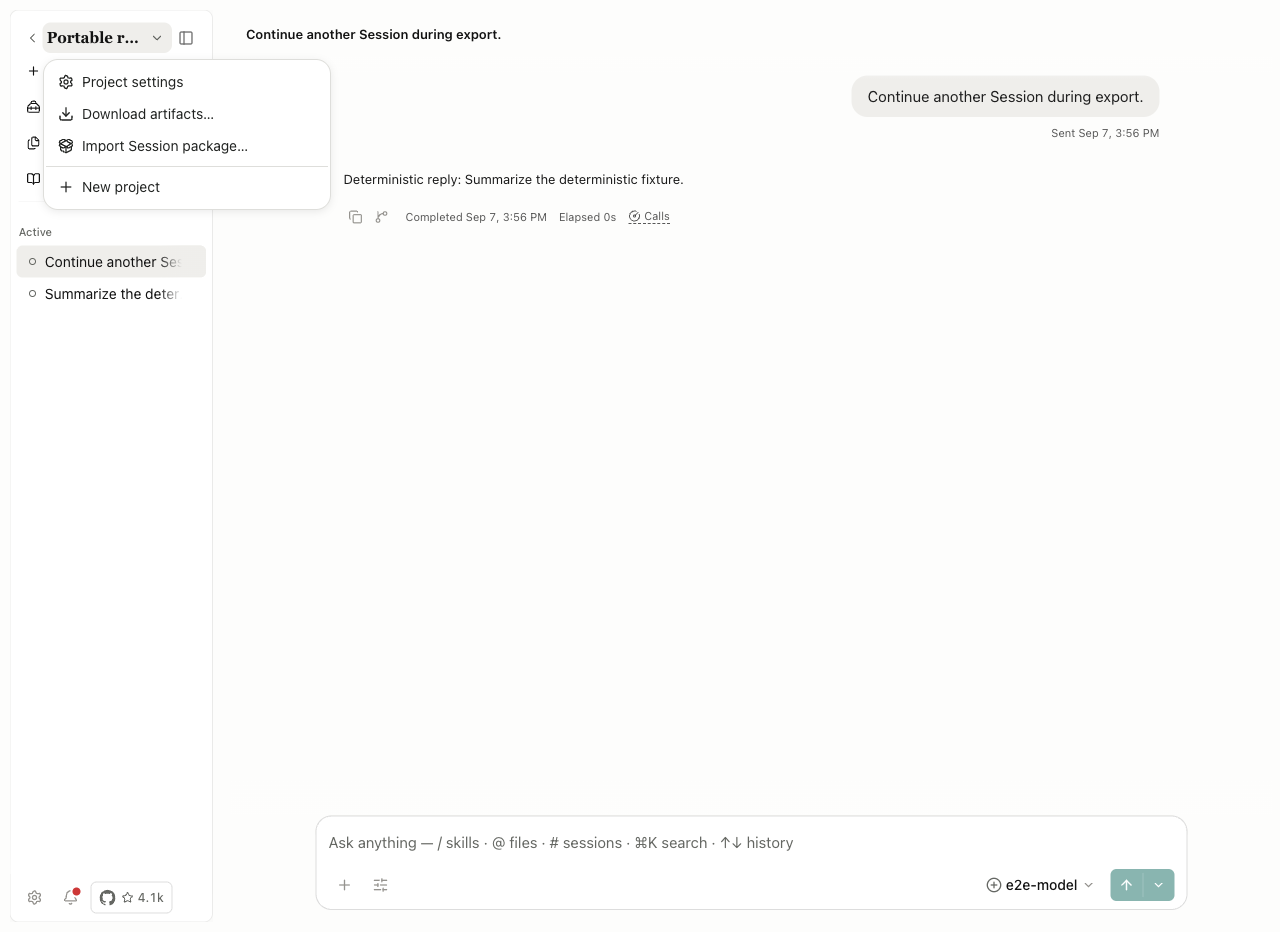
Figure 4. The destination Project menu provides the Import Session package entry.
Before confirming, check the package title, destination project, and included or omitted contents. When import completes, select Open imported Session.
Then perform an acceptance check: locate the relevant branch, open the main result, and find the inputs needed for your task. This is where you establish whether the handoff contains enough material for the intended review.
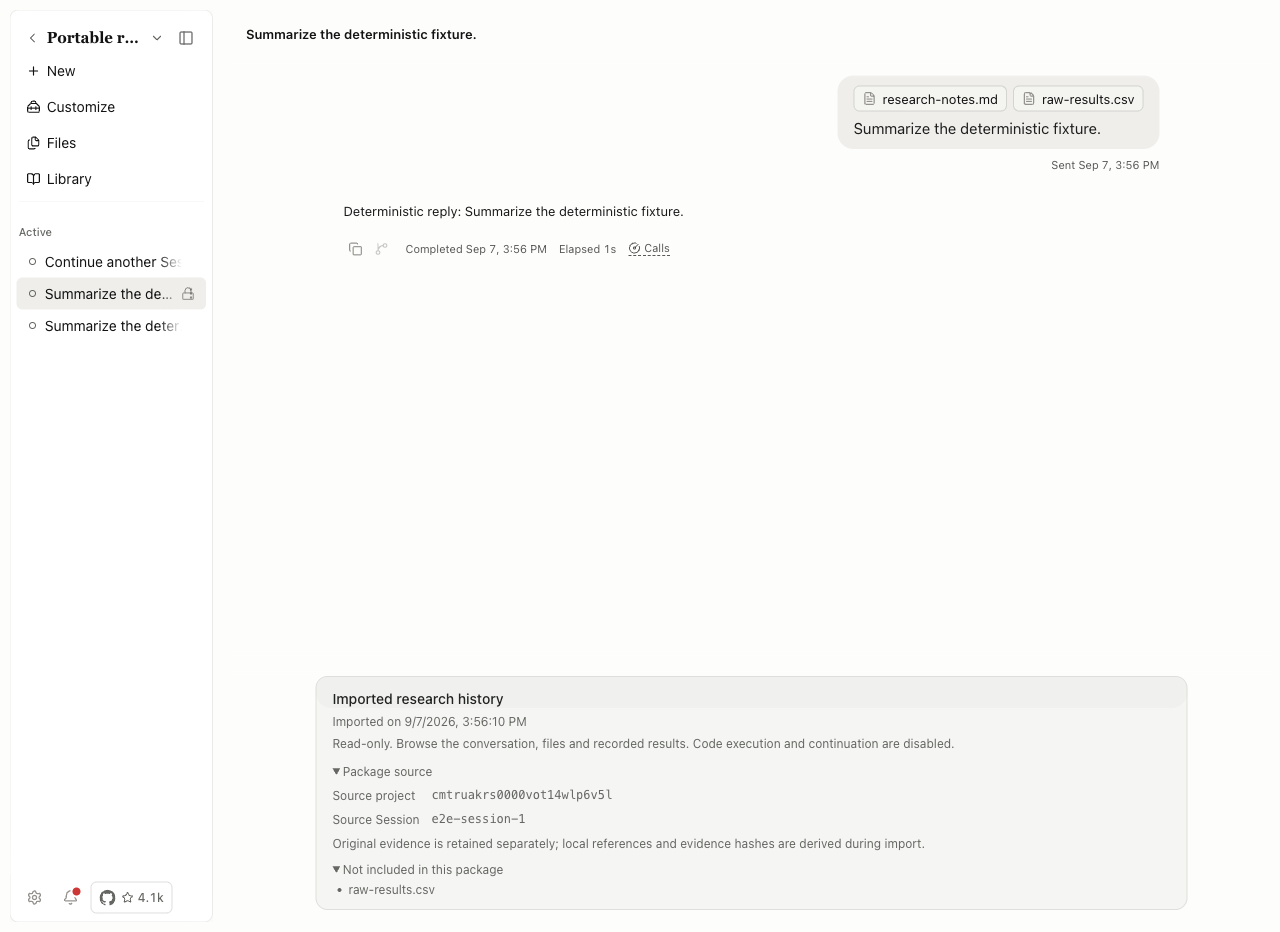
Figure 5. The imported-history notice identifies the source and lists raw\-results\.csv under “Not included in this package.” A historical attachment reference can remain visible without its file contents.
If a required file is absent, request that version from the sender or obtain a revised package. Keep its identity and version associated with the imported record.
How to continue research after importing a package
The imported record itself remains read-only, with execution and in-place continuation disabled.**In v0.32.0, you have two routes for further work: fork it into a writable continuation, or create a separate normal session that references the imported history.**Therelease limitationsexplicitly preserve the fork option.
RouteWhen it is usefulWhat to prepareFork into a writable continuationDevelop the imported work further in a new writable sessionConfirm inputs, model configuration, dependencies, services, and permissionsStart a separate session and reference the historyUse the earlier research as background for a distinct questionSelect the session reference and provide the files needed for the new taskForking creates a writable continuation; it does not turn the imported original into an executable session. Thereleased fork implementationalso resets execution state and treats imported configuration as belonging to another installation.
Whichever route you choose:
- Identify the result and decision you want to revisit.
- Confirm that the required files, dependencies, services, and permissions are available.
- State the intended change and save new outputs separately.
An illustrative follow-up request is:
Inspect the input table and the code behind the selected figure. List missing dependencies or inputs before proposing a new run. Save any new outputs separately and explain what changed.
For the separate-session route, first select the imported history using the session reference picker. Seehow session references workfor the context-access workflow.
What does a package tell you about reproducibility?
A package makes recorded evidence available for inspection. Determining whether a result reproduces requires examining the checks and, where necessary, performing a new execution and comparison.
QuestionEvidence to examineDid the expected files arrive?Included and omitted contents, versions, and integrity informationWhat did the sender check?The verification record, its target version, and comparison conditionsDoes a new run reproduce the result?A separately completed execution and output comparisonA received verification record describes checks supplied by the source installation.**Import is not a fresh verification on the receiving computer.**A checksum establishes byte-level integrity; it does not validate scientific claims or authenticate the sender. These distinctions are stated in thepackage implementation.
If another check is needed, follow thereproducibility workflow. It requires supported captured evidence, relevant inputs, and an available environment. Read the output comparison as well as the execution status. Researchers remain responsible for assessing the method and interpreting the result.
A practical handoff checklist
Use this checklist to make the package understandable to someone who did not participate in the original work.
Sender checksRecipient checksName the question, result version, and intended reviewLocate the corresponding branch and resultInclude the materials required for that reviewOpen the files and inspect omissionsSave essential context in the conversation or reportRead the handoff note before beginningCheck whether conversation text, files, and evidence may be sharedHandle the materials under applicable permissionsIdentify completed checks and unresolved issuesDistinguish source checks from any new verificationExplain external inputs or services still neededPrepare them before additional analysisA brief note might say: “Please review figure version 3 against the included input table. The selected branch explains the preprocessing change. Check the method before deciding whether another run is needed.”
Package export excludes account credentials, permission grants, and provider continuation identities, as recorded in theexport implementation. Still review the actual research content before sharing: text and files may contain information that should remain private.
A sent package is an independent copy. Deleting the local session does not remove copies already distributed.
Common questions about .science packages
Which application opens a .science research package?
Use AIPOCH Open-Science’s package-import workflow. Open the destination Project menu and chooseImport Session package…, or drop the file into the project.
Does Full export include my entire project?
No. Full export selects available files within the session-package scope, subject to export limits. Review the contents shown in the export preview.
Are Side Chat and private bookmarks included?
No. Save information the recipient needs in the conversation or a report before exporting.
Does the recipient inherit my API keys or permissions?
No. The package does not transfer account credentials or permission grants. Review the conversation and files for sensitive research information before sharing.
Can I run the code directly inside imported history?
No. The imported record itself remains read-only. In v0.32.0, you can fork it into a writable continuation or create a separate session that references it. Neither route automatically restores omitted files, credentials, services, or the original environment.
Why is a file visible but unavailable to open?
Its contents may have been omitted while the historical reference was retained. Check the import notice and omitted-file list, then obtain the needed file version from the sender.
What should I do if a transfer fails?
Read the error and cleanup state. UseRetry cleanupwhen cleanup is pending.Try againretries the original file and destination; select another package separately. Theofficial research-package guideexplains these controls.
Prepared by AIPOCH from feature documentation, supplied product screenshots, public guides, and released source code. This is a documented workflow guide, not a report of a newly executed research experiment or transfer benchmark.
Similar Articles
@svpino: Open-Science is a cool open-source workbench focused on reproducibility. AI agents search for scientific sources, run P…
Open-Science 是 AIPOCH 推出的开源、本地优先 AI 科研工作台,结合智能体工作流、Python 与 R 执行以及可追溯的研究产物,所有结果都保留输入、代码与执行证据,便于复现与对比工作流。
@rohanpaul_ai: This is a big win for reproducible research. AIPOCH has released Open-Science, a free, open-source desktop app where AI…
AIPOCH released Open-Science V1.0.0, a free open-source desktop app where AI agents run scientific analyses while preserving reproducibility via a new .science file that packages code, conversation branches, and verification evidence for sharing and replication.
@rohanpaul_ai: An Apache-2.0 app with 4.8K GitHub stars is trying to make AI-assisted science as traceable as checksummed, versioned c…
一个 Apache-2.0 开源桌面应用 Open-Science 试图让 AI 辅助科研像带校验和与版本控制的代码一样可追溯:AI 代理阅读论文、调用科学数据库、运行 Python/R 代码,并将输入数据、代码与运行历史一并保存为可分享的 .science 文件,实现本地优先、模型无关的可复现研究。
@vintcessun: Finally, someone has paved the way for AI-assisted research, connecting the once fragmented pipeline. Writing papers, compiling literature reports, generating simulation figures, and creating defense slides — in the past each step required manually shuffling data and copying results. Now, three Skills tie the entire workflow together: from scientific-toolkit for computing data and generating figures, feeding directly into research-writing for the main text, and then letting office-academic produce editable PPTs and Word documents, completely eliminating repetitive manual effort. The core is a complementary collaboration set, installable with one click in Claude Code and Codex, with Chinese-first support.
A report on an AI-assisted research tool that connects the entire research workflow through three Skills (scientific-toolkit, research-writing, office-academic), from data computation to paper writing to PPT creation. It supports one-click installation in Claude Code and Codex, with Chinese-first priority.
@PierceZhang34: Sharing an open collaborative repository focused on AI-assisted research: Awesome Vibe Research. The core goal is to collect and curate reusable, verifiable, and evolvable AI-assisted components across the full research workflow (from idea generation to paper publication and dissemination), including: Agents, Skills...
Shared an open collaborative repository Awesome Vibe Research maintained by ModelScope. This repository collects and curates reusable, verifiable, and evolvable AI-assisted components across the full research workflow, including agents, skills, workflows, tools, and best practices. It aims to help researchers and developers leverage AI to improve research efficiency.